
PromptForge
Enterprise AI prompt libraryYour organisation’s best AI prompts in one shared, versioned library. Not scattered across chat histories.
A shared library for AI prompts. Teams keep the prompts that work, version them and pass them on, so nobody starts from scratch.
For enterprises
Good prompts go missing
Once a team uses AI every day, the prompts that work turn into real know-how. Right now they live in personal chat histories, notes or messages. Everyone starts from scratch. Results differ from one colleague to the next, and nobody can tell which version is the good one. When someone leaves, their prompts go with them.
Why it’s built the way it is.
Every change is a version
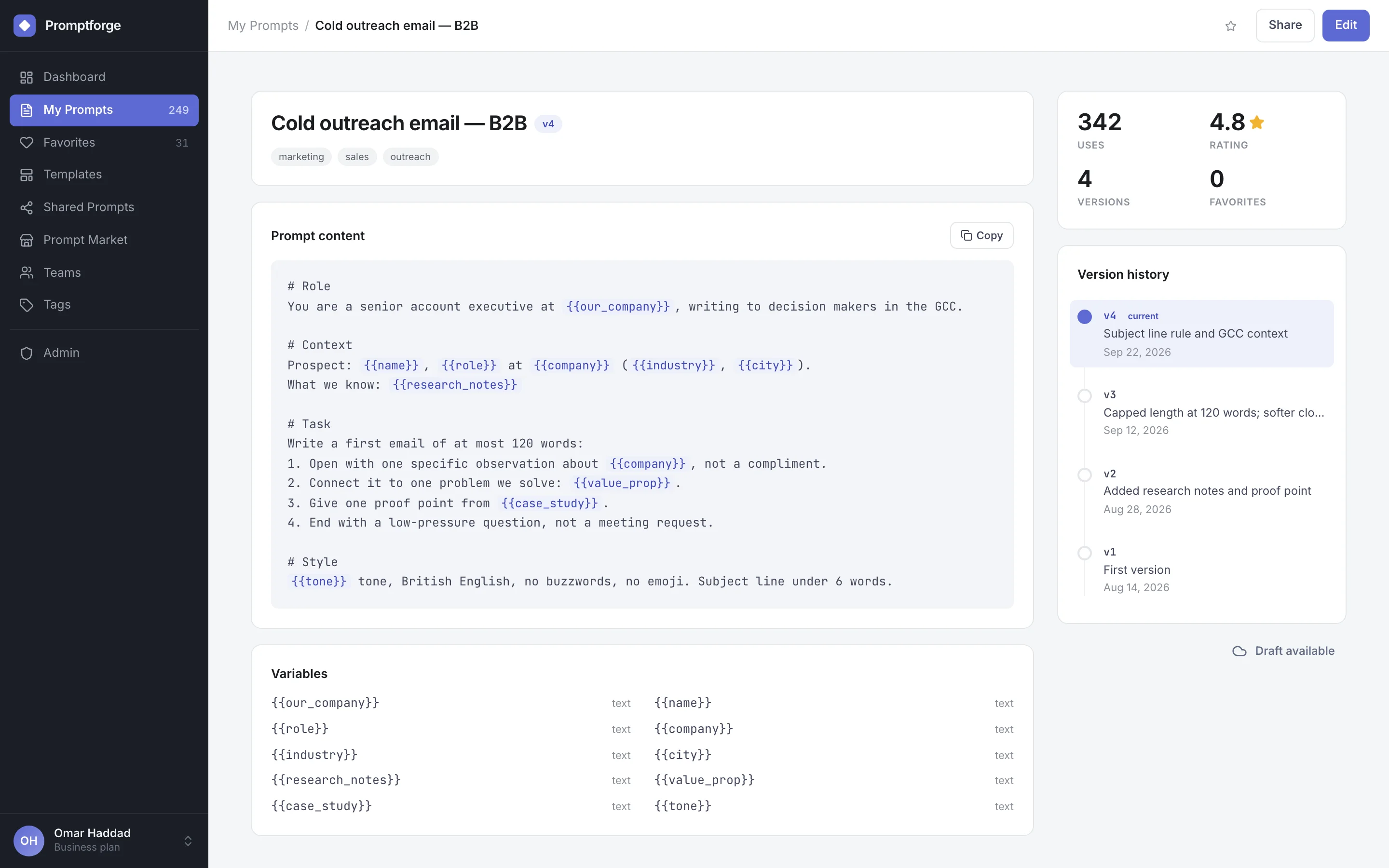
Each prompt keeps its whole version history, with change notes. Compare versions side by side before you roll one back or reuse it.
Made for teams, not only individuals
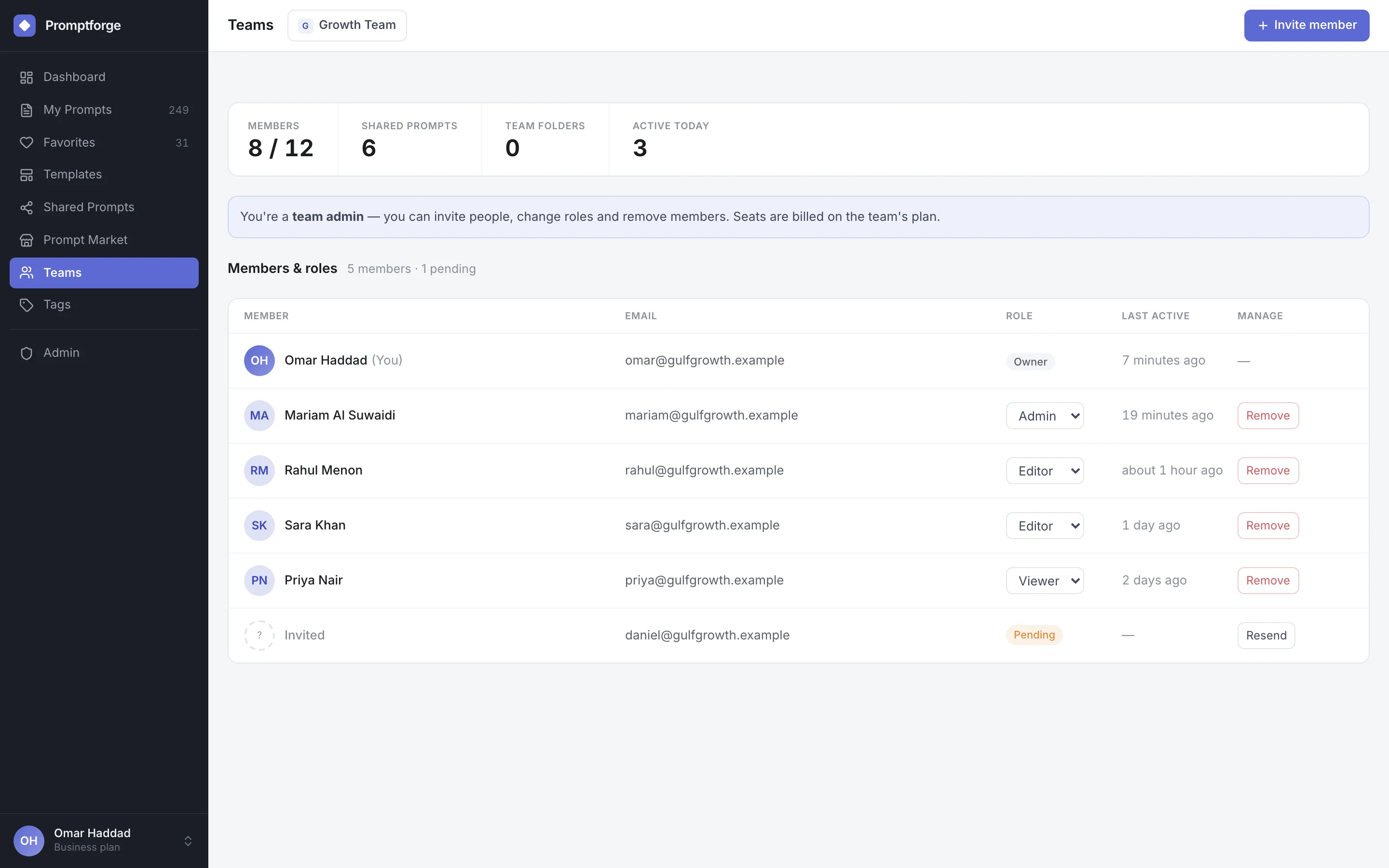
Teams keep their prompts in one place. There are owner, admin, editor and viewer roles, invitations, and a record of who changed what.
Templates with variables
Placeholders like {{company}} or {{tone}} are picked up automatically. One well-written prompt then covers many situations.
Governed like any other business system
Admin pages handle moderation and monitoring. Security settings include verified domains, and single sign-on runs through your identity provider.
From setup to everyday use.
- 1
Collect what already works
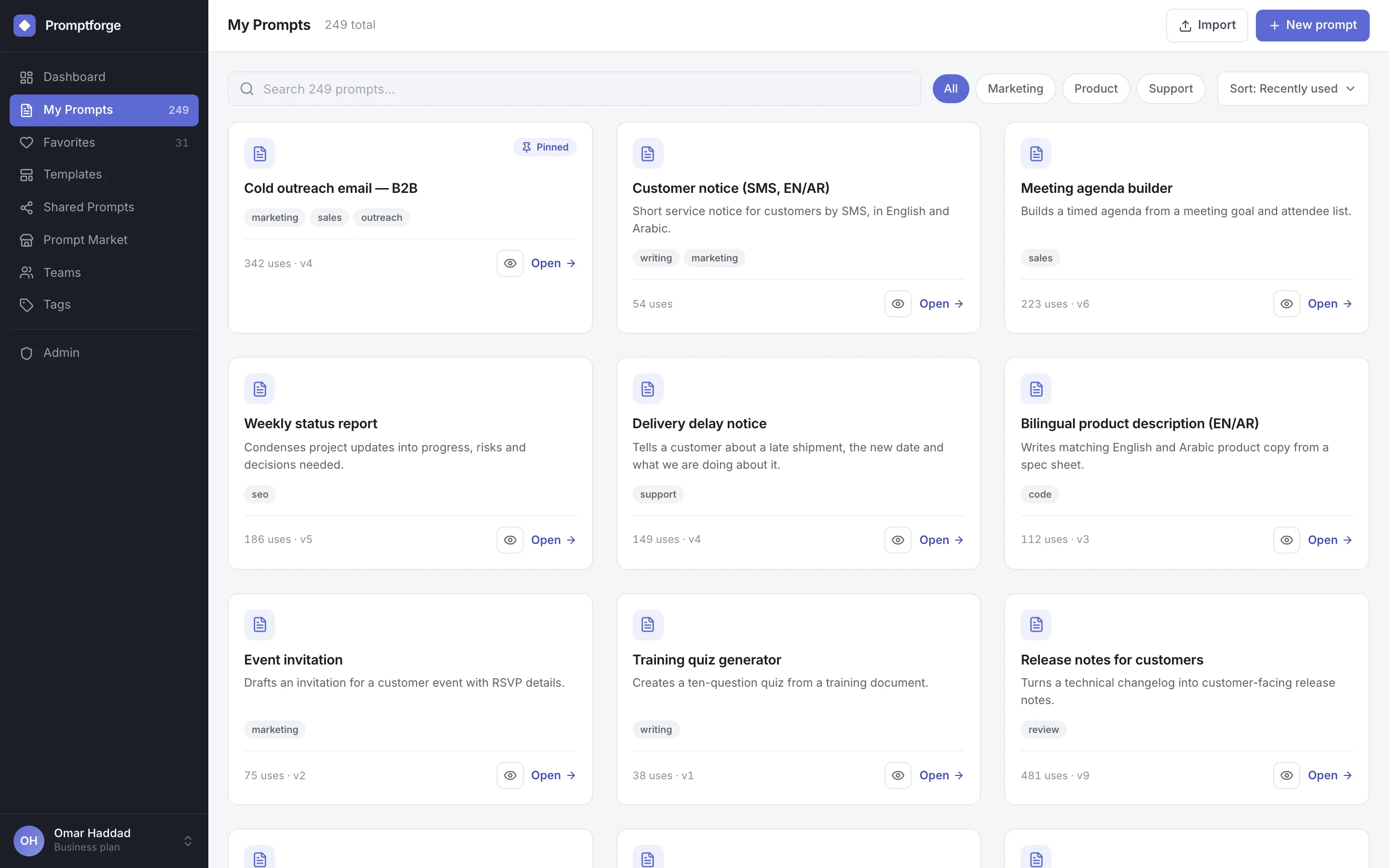
People save the prompts they rely on, with a description, tags and a folder. Or they start from a ready-made template.
- 2
Organise and improve
Pin prompts and favourite them. Group them, refine them as you learn; each edit becomes a new version with a note attached.
- 3
Share with the team
Share a prompt inside a team, with one colleague or by link. Roles decide who can view it and who can edit.
- 4
Find and reuse
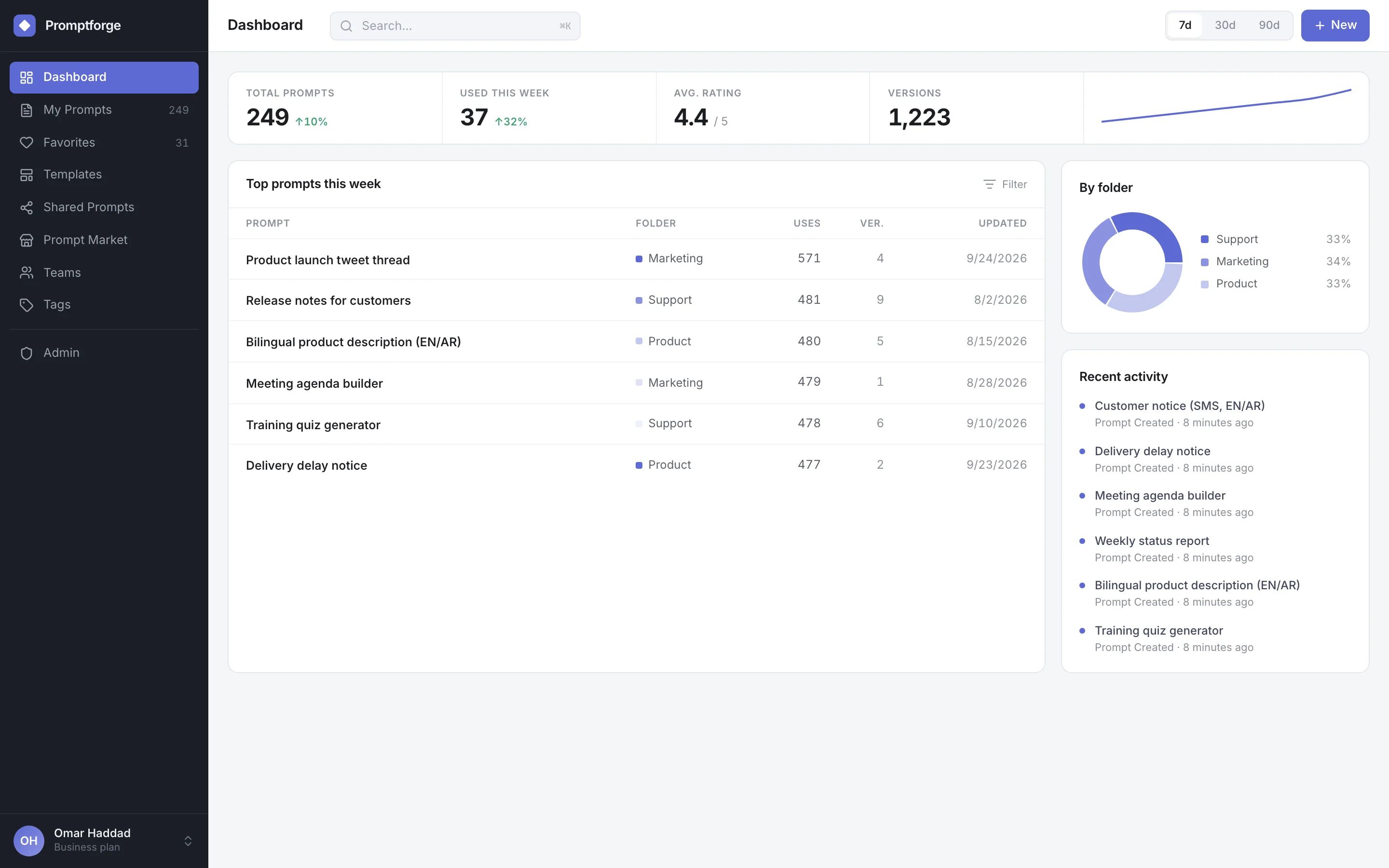
Search by title, tag or content. See which prompts get used most, and copy the right one in seconds.
See PromptForge at work.
What it does, in detail.
Prompt library
- Tags, folders and collections Organise prompts around how your teams actually work. Pin the ones people reach for most.
- Favourites and templates Keep your own favourites, and start new prompts from shared templates.
- Variable detection Placeholders in double braces are found and listed, so people know what to fill in.
- Search and filters Search titles, tags and content. Sort by recent use or by popularity.
Versions and quality
- Full version history Every saved change is kept, with its note and its date.
- Side-by-side comparison Put two versions next to each other and see exactly what changed.
- Usage and ratings How often each prompt is used, and what colleagues think of it.
Teams and sharing
- Roles and invitations Owner, admin, editor and viewer roles. Invitations go out by email, and seats are managed in the app.
- Team prompts and activity A shared library for the team, with an activity log showing who created or changed what.
- Share links Send someone a single prompt by link.
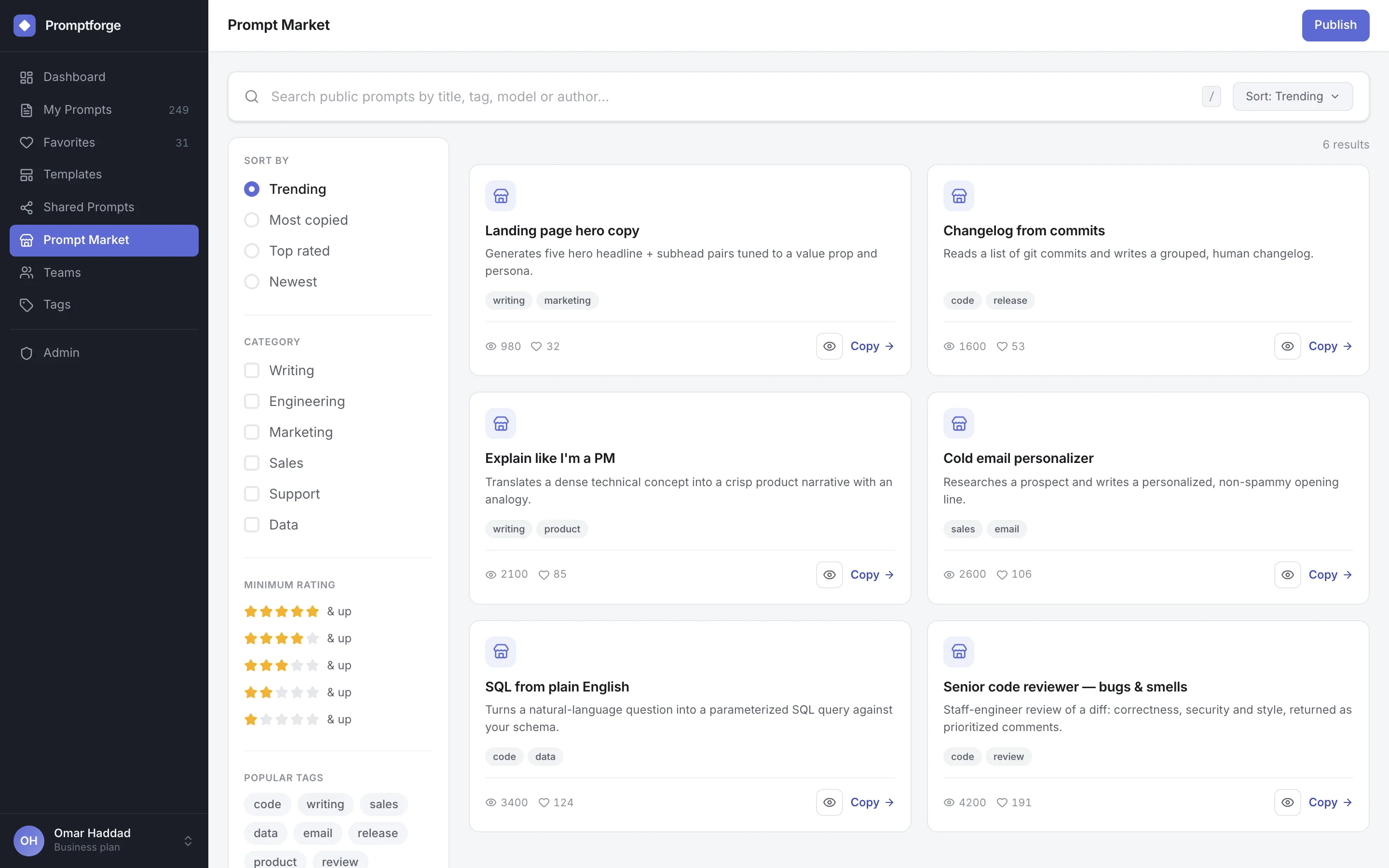
- Prompt market Publish prompts so others in the organisation can find them, rate them and copy them.
Administration
- Single sign-on Sign in through an OpenID Connect identity provider or Google, as well as with email and password.
- Moderation Rules, a review queue and logs for anything published to shared spaces.
- Security settings Verified email domains, and an audit log for team administrators.
- Monitoring Platform health and usage, plus caching, on the admin pages.
Who uses it, and for what.
Marketing and communications
Approved prompts for campaigns, bilingual copy and press material. Every writer starts from the version that works.
Customer service
Shared reply prompts for complaints, delays and refunds. Answers stay consistent whichever agent is on shift.
Engineering and data teams
Prompts for code review, SQL generation and release notes, kept in versions the whole team can trust.
At a glance
- Runs on
- Web browser; server on Linux containers
- Deployment
- Hosted by Azrty, or on your own infrastructure (Docker or Kubernetes)
- Requirements
- PostgreSQL and Redis
- Sign-in
- Email and password, Google, or your OpenID Connect identity provider
- Built with
- Next.js, React, TypeScript, Prisma
Questions
Where is our data stored?
In an environment we host for you, or on your own infrastructure. If your prompts hold sensitive know-how, run it in your own data centre or cloud account and everything stays inside your boundary.
Does it work with any AI model?
Yes. PromptForge stores and organises the prompts. People copy them into whichever AI tool your organisation uses.
Can we connect it to our single sign-on?
Yes. Use OpenID Connect, which most identity providers support, or Google sign-in.
Who can see a prompt?
Only its owner, until they share it. After that, teams, roles and share links decide who can view or edit. Team activity is logged.
How is it priced?
Per seat. The price depends on the plan, how many users you have and whether we host it. Book a demo and we’ll put a proposal together.
AI that solves one job, properly.
NovaGrade
Schools and exam boardsAI marking of open-ended exam answers, criterion by criterion. It is built into Kodak scanning, so teachers review instead of mark.
Learn moreDNS platformNexora
Enterprises and telecom operatorsA DNS platform for enterprises and telecom operators. Resolving and filtering, plus authoritative DNS, run from one console across a fleet of servers.
Learn moreSee it on your own data.
We run the demo with your data, then propose a scope and pricing.