
Dhole
AI, automation and CI/CD/CT platformBuild pipelines, infrastructure jobs and AI agents, all on one engine you host yourself.
One workflow engine for build pipelines and infrastructure automation that also orchestrates AI agents, with a person approving where it matters.
Three tools doing one job
CI lives in one product. Scheduled automation lives in another, and the AI agent experiments sit in a third. Each keeps its own retries and its own idea of state, and each has its own blind spots: a retried step deploys twice, a restart drops a job that was waiting on an approval, and nobody can tell you which model gave an answer or what it cost. Dhole replaces all three with one engine that treats every one of them as a pipeline.
Why it’s built the way it is.
The data sets the order
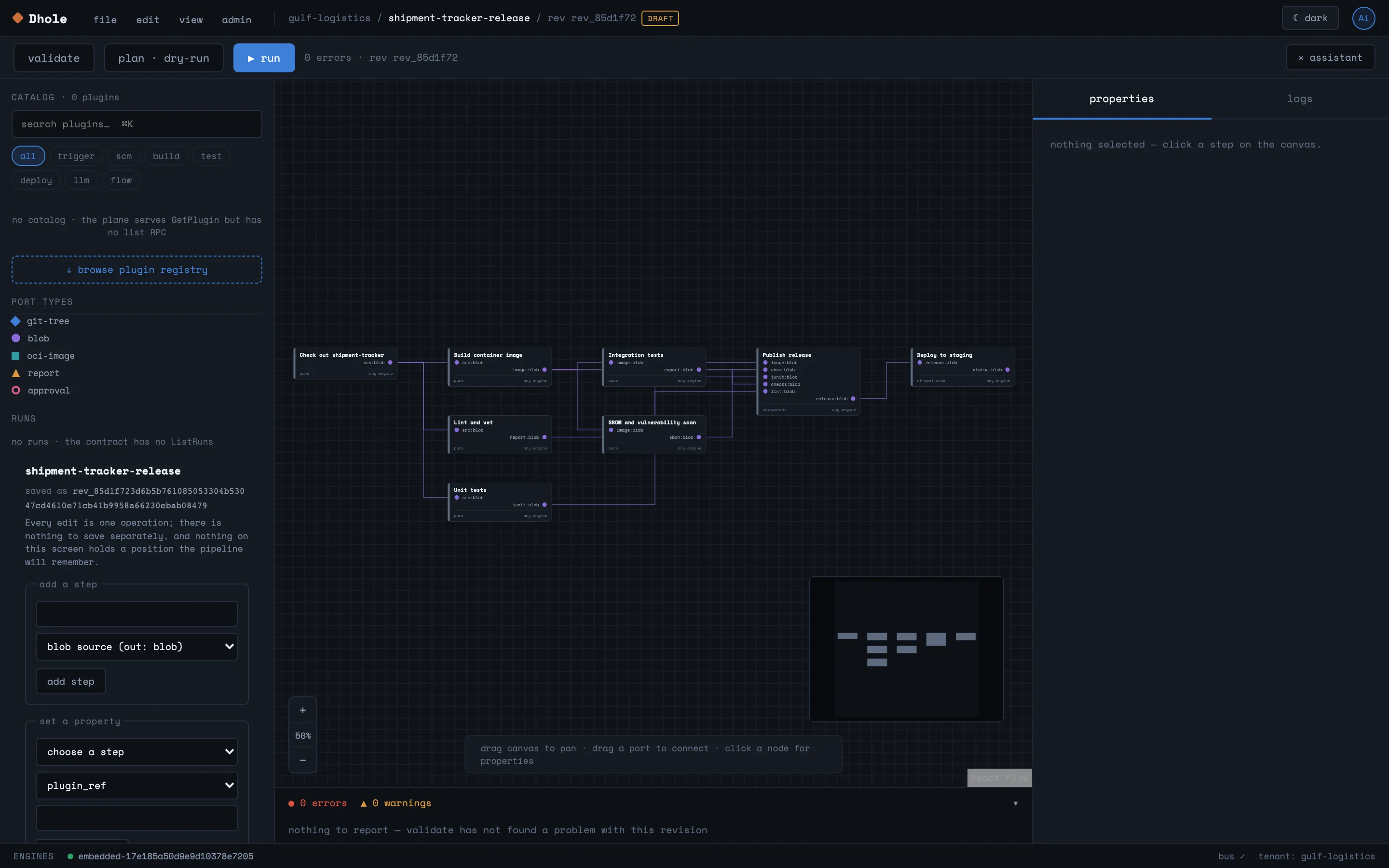
Each step declares typed inputs and outputs, and Dhole works out the order from those. Steps that don’t depend on each other run in parallel. Nobody has to arrange it.
A cache you can trust
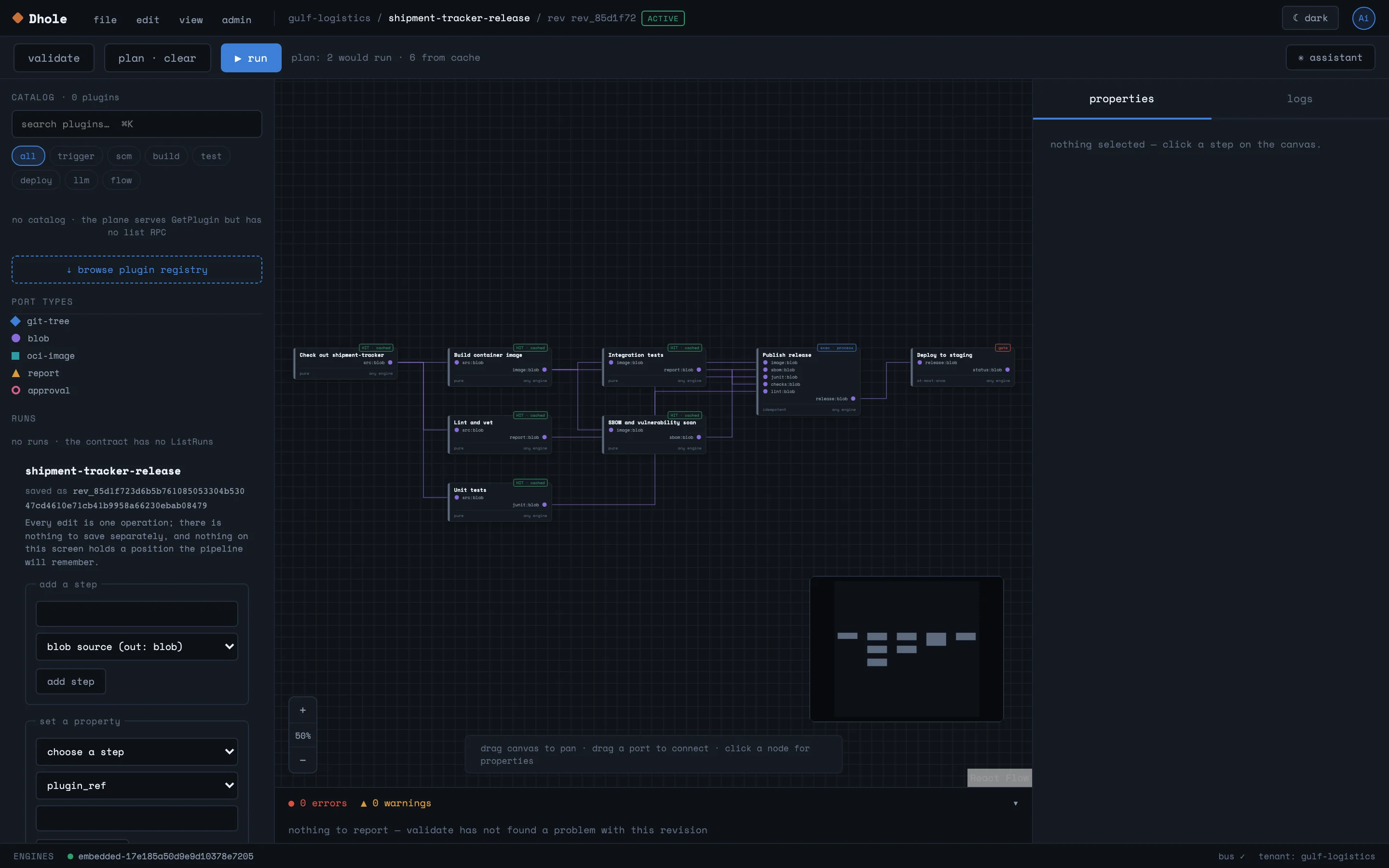
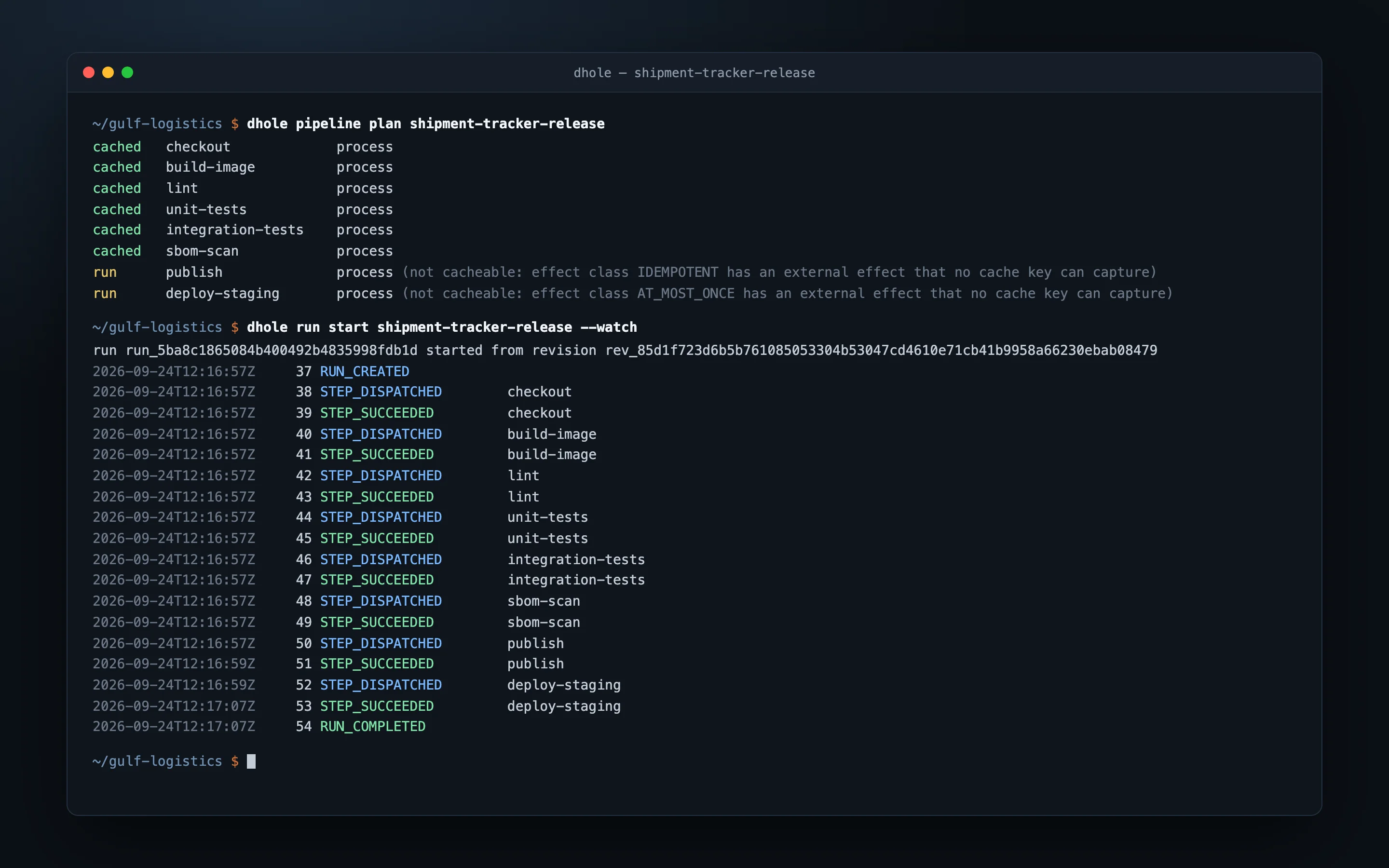
Results are keyed on the content of their inputs, so a step whose inputs haven’t changed comes from the cache instead of running again. Before anything starts, the plan tells you which steps will run and which will be served from the cache.
Side effects are declared up front
Every step states whether it is pure, safe to repeat, or must happen at most once. That single setting governs caching and retries. A deployment or a payment never gets replayed by accident.
Restarts don’t lose work
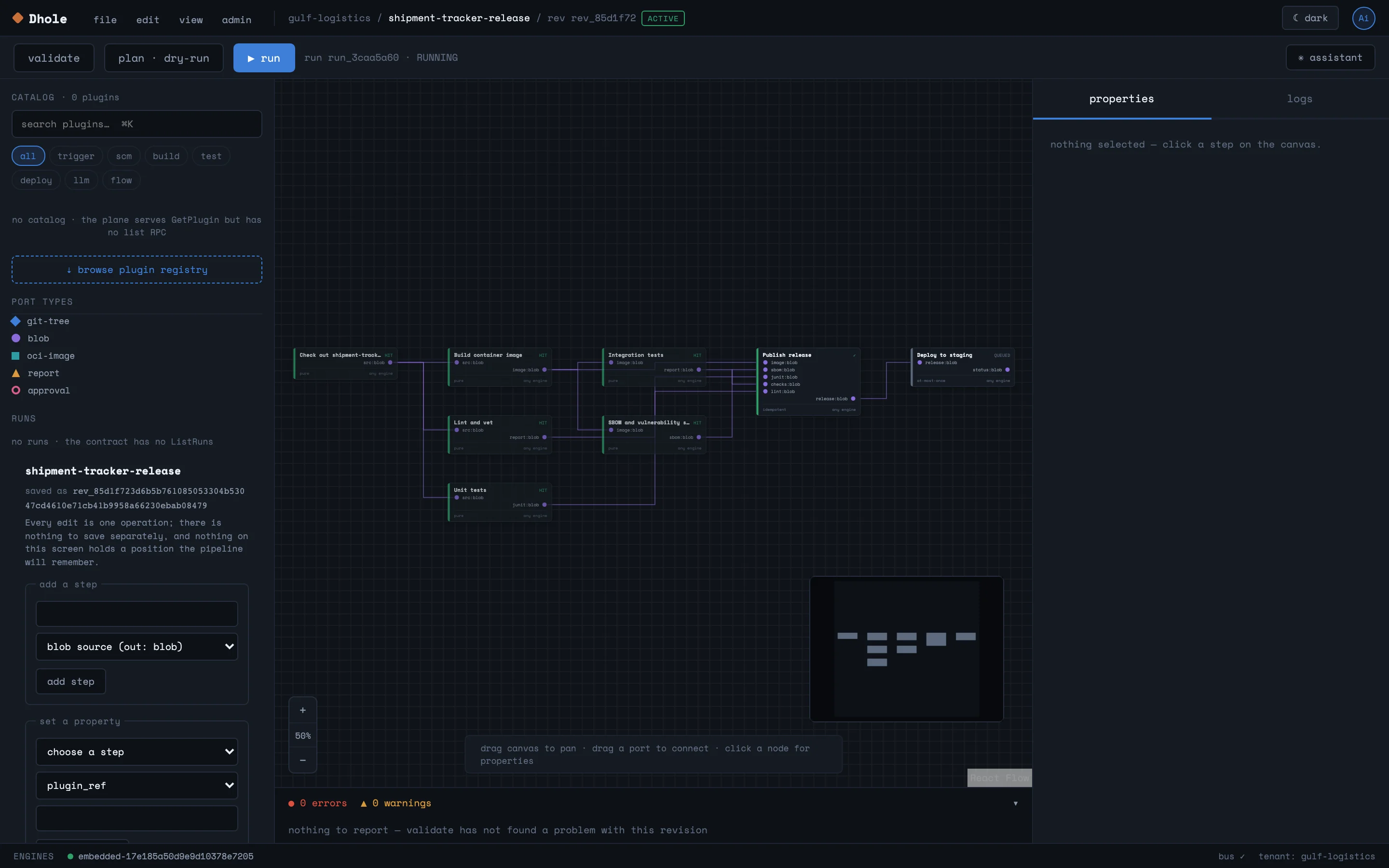
Each run is an event log. A pipeline can sit for days waiting on an approval or a timer, and restarting the control plane won’t lose anything in flight.
From setup to everyday use.
- 1
Describe the pipeline
Draw it in the visual editor or write it as YAML. Already on GitHub Actions, GitLab CI, Woodpecker or n8n? Import the workflow.
- 2
Review and approve
Every change becomes a new revision. Validation and a dry-run plan show what would run, and a revision can only run once someone other than its author has approved it.
- 3
Start it however suits you
A schedule, an HTTP call, a git webhook, the command line or the API can start a run. So can an AI agent, through that same API.
- 4
Engines do the work
Engines on your own machines or in Kubernetes pick up steps over an outbound connection. That means they can live on a build Mac, on a GPU server, or behind a firewall.
- 5
Follow and decide
Watch each step on the canvas or in the terminal. Answer approval gates as they come up, or cancel a run along with every step it holds.
See Dhole at work.
What it does, in detail.
Pipelines
- Visual editor A React Flow canvas showing every step, its ports and its connections, with validation alongside.
- Revisions and approval Each edit creates a revision. Only approved revisions run, and nobody can approve their own.
- Dry-run plan See what would execute, what is already cached and where each step would land.
- Importers Turns GitHub Actions, GitLab CI, Woodpecker and n8n definitions into Dhole pipelines.
- Git mirror Definitions are kept in the server’s database and mirrored one way to a git repository, for history and review.
Execution
- Content-addressed cache A pure step with unchanged inputs is served from the cache, not run again.
- Durable waits and approvals Timers and human approval gates are stored with the run. A restart doesn’t touch them.
- Engines in any language Engines implement a published wire contract, checked by a conformance suite, and only ever connect outbound.
- Host and Kubernetes executors Run steps as host processes, or as pods in a Kubernetes cluster.
- Triggers Schedules, HTTP calls and git webhooks fill in a pipeline’s typed inputs and kick off a run.
AI steps
- Model calls with a schema An LLM step asks for JSON and checks the answer against a declared schema. It also records which model answered and what that cost.
- Bounded loops Repeated steps hit a hard ceiling, enforced by the control plane rather than trusted to the step.
- Agents with limits An agent step acts as its own user, through Dhole’s own API, and can take only the actions it was granted.
- Untrusted data is tracked Anything arriving from webhooks or other outside sources is marked as tainted. Policy then decides what a tainted step is allowed to do.
Security and operations
- Policy in CEL Rules set what each trust tier may run. You can test them from the command line, and every decision is audited.
- Step secrets A step names the secret it needs. It gets the value at run time and nowhere else.
- Signed plugins Plugin signatures are checked with cosign against a Sigstore trust root.
- Tenants and tokens Every call is authenticated and scoped to a tenant. The API has no anonymous access.
- OpenTelemetry Traces and metrics go out from every part of the system to the collector you already run.
Who uses it, and for what.
Build and release pipelines
Test, build, scan and publish your software. Unchanged steps come from the cache, and the deployment step is never retried by accident.
Scheduled infrastructure automation
Nightly jobs, certificate renewals and data syncs that run on a schedule across several machines, pausing for a person to approve the risky part.
Controlled AI workflows
Put model calls and agents inside a pipeline: structured output, hard loop limits, a human approval before anything acts, and the cost on record.
At a glance
- Runs on
- Linux, macOS and Windows (amd64 and arm64); Kubernetes through a Helm chart
- Deployment
- One binary for a small team, or a control plane with remote engines as you grow
- Storage
- SQLite or PostgreSQL; local disk or S3-compatible object storage; NATS JetStream for messaging (embedded or external)
- Interfaces
- Visual editor, command-line tool and a ConnectRPC API, all on the same contract
- Integrates with
- Git webhooks, Kubernetes, OpenID Connect identity providers, OpenTelemetry and 40 AI model providers
- Built with
- Go, protobuf and ConnectRPC; CEL for policy; React and React Flow
Questions
Can we run it entirely on our own infrastructure?
Yes. Dhole is self-hosted. The control plane, the engines, the database and the object store all run where you put them, on-premises or in a UAE cloud region included.
Do we have to rewrite our existing pipelines?
Not by hand. Dhole imports GitHub Actions, GitLab CI, Woodpecker and n8n definitions, and you refine the result in the editor.
How do AI agents fit in without becoming a risk?
An agent step can take only the actions it was granted, and it goes through the same authenticated API as everyone else. Loops have hard limits. Outside data is marked as untrusted, and policy plus approval gates decide what happens next.
What does it need to run?
A small team needs one machine and the single binary. Nothing else. Bigger setups add PostgreSQL, S3-compatible storage, NATS, and engines on the machines where the work belongs.
How is it priced?
It depends on the size of the deployment and the support you need. Book a demo and we’ll walk through it using your own pipelines.
Your models, your hardware, your rules.
FastLLM Proxy
An OpenAI-compatible gateway in front of your own LLM servers and 80 hosted providers. Routing, budgets and access control live in one place.
Learn moreAgent, model and GPUaaS platformKuvryn AI
The platform for running AI agents, models and GPUs as a service. Teams run their agents and models on your own GPU servers, each in its own space, all from one console.
Learn moreAI application platformKuvryn
A self-hosted platform for AI applications on Kubernetes. See each application with its parts and its health, and when something breaks, the reason why.
Learn moreGitOpsSolder
A lightweight Kubernetes operator that keeps clusters in line with Git. It handles approvals and drift detection, and rolls back on its own. No database, no queue, no extra UI to run.
Learn moreSee it on your own data.
We run the demo with your data, then propose a scope and pricing.