
FastLLM Proxy
LLM gatewayOne fast endpoint for every model you run or buy. You decide the routing, the access and the spend.
An OpenAI-compatible gateway in front of your own LLM servers and 80 hosted providers. Routing, budgets and access control live in one place.
Every team calls AI its own way
The usual picture: a few models on your own GPUs, several cloud providers, and a dozen applications calling each of them differently. Keys get shared. Nobody can say who spent what. Moving a workload to another model means changing code. And the gateway brought in to fix all this often turns into the slow, fragile part itself.
Why it’s built the way it is.
The gateway is never the slow part
Access checks, rate limits and budgets are answered from memory. Responses stream to the client exactly as they arrive, never decoded and re-encoded. On the same cluster, with the GPU taken out of the picture, it served about 15 times as many requests per second as LiteLLM, and on real GPUs its 99th-percentile time to first token was far steadier.
Your GPUs’ prompt cache stays warm
vLLM and SGLang answer faster when a request reaches the server that already holds its shared prompt. FastLLM Proxy sends it there. The exception is when that server is clearly busier than the rest; plain round-robin would scatter the work and throw the cache away.
Routing lives in configuration
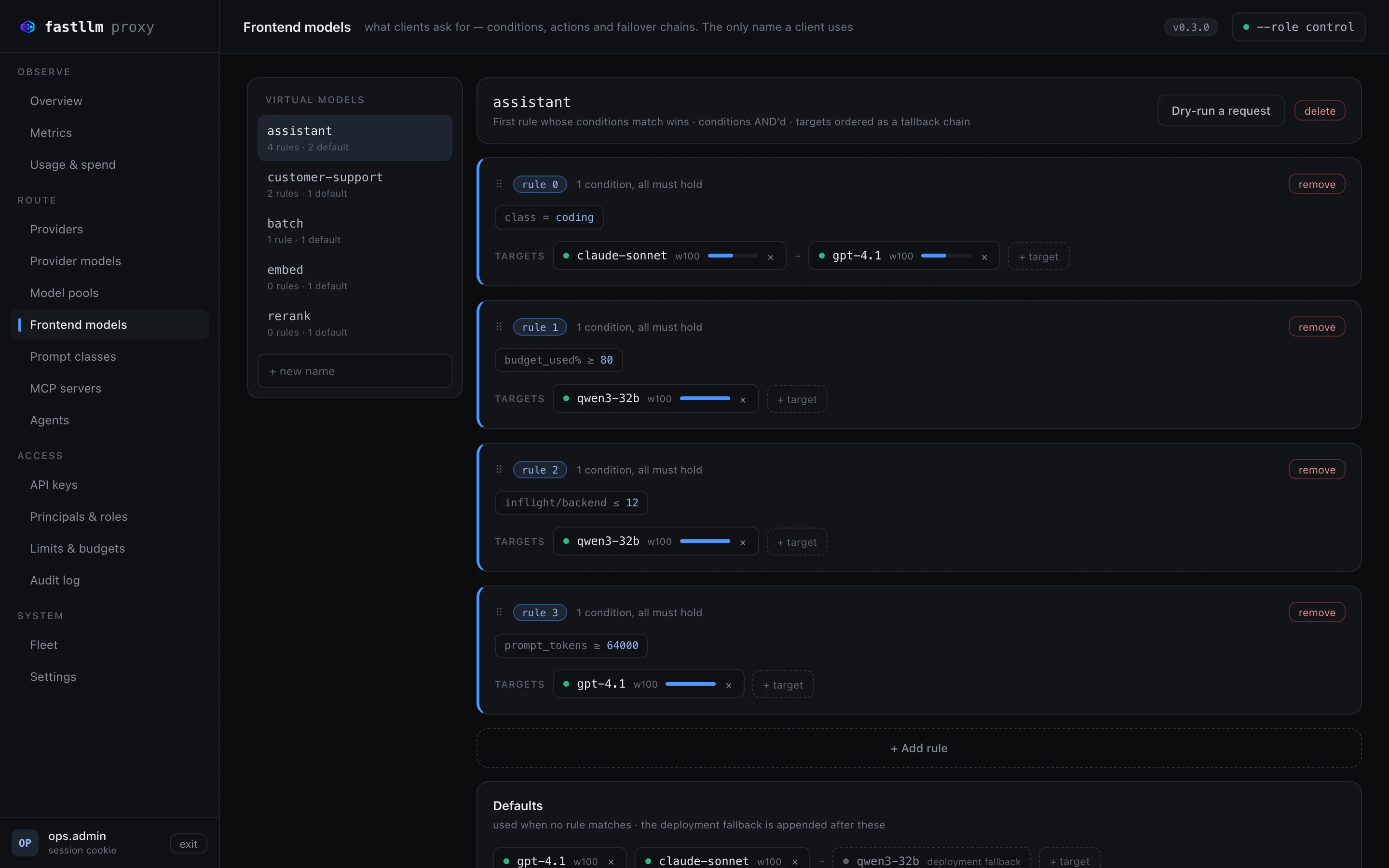
Applications ask for one name, say "assistant". Rules decide where it goes: by team, prompt size, budget used, load, time of day or what the prompt is about. Each rule has an ordered failover chain behind it.
Slots in where LiteLLM already runs
It reads your existing LiteLLM configuration files unchanged. An importer carries over models, keys and each key’s grants, so the keys people already use keep working.
From setup to everyday use.
- 1
Connect your models
Add your own vLLM, SGLang or llama.cpp servers and any of 80 hosted providers, or import a LiteLLM config. A small agent on each GPU server can register its endpoints for you.
- 2
Name what applications can ask for
Create frontend models, the only names clients ever use. Then write the rules and failover chains that pick which provider model serves each request.
- 3
Hand out keys with limits
Each application or team gets its own API key, a role with per-model grants, a rate limit, and a token or spend budget.
- 4
Point applications at one endpoint
Clients speak the standard OpenAI API to a single address. When you move a workload to a different model, their code stays as it is.
- 5
Watch usage and adjust
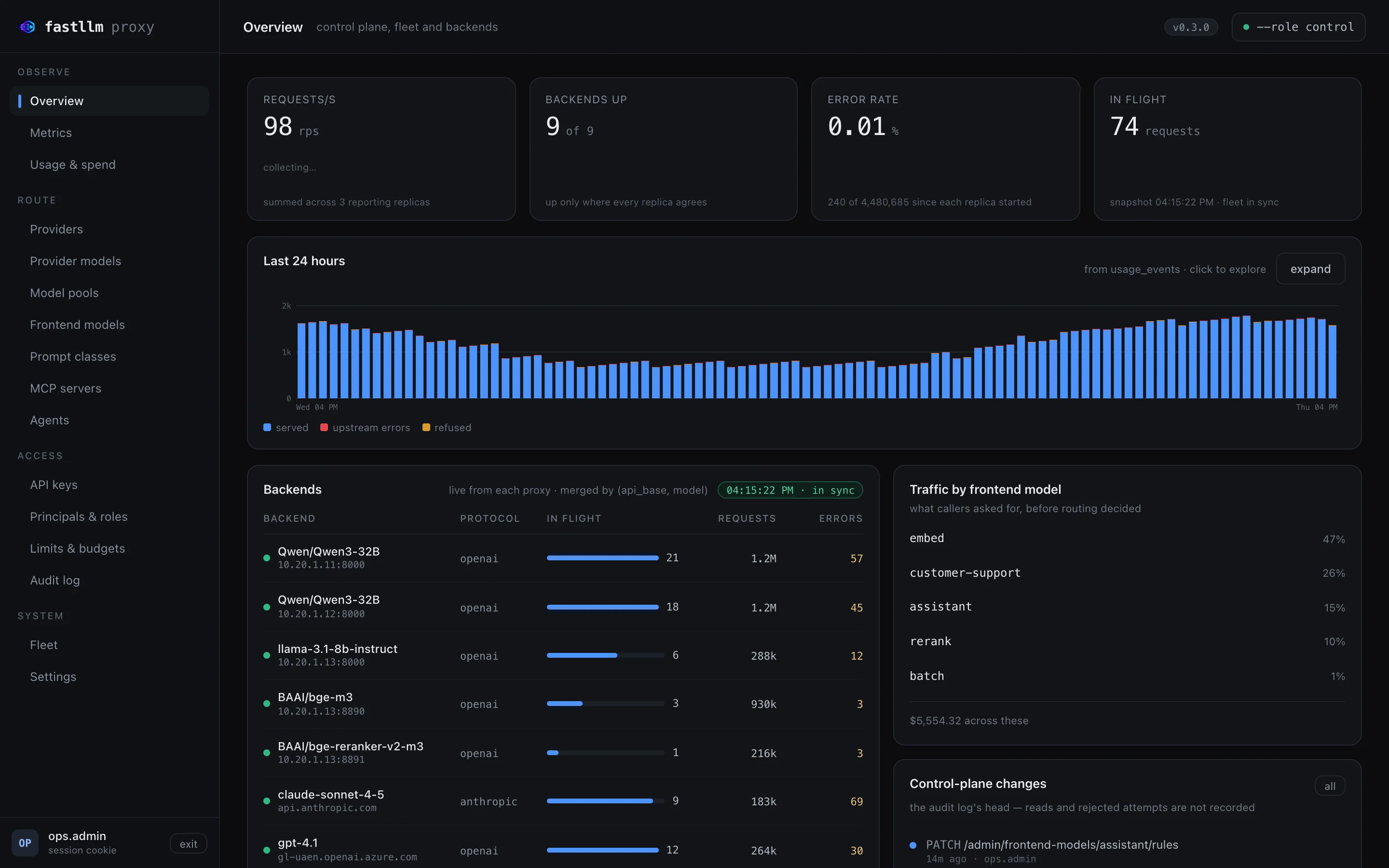
The console shows traffic, errors, spend by team and model, and every configuration change. Tune routing and budgets from the evidence, not from guesses.
See FastLLM Proxy at work.
What it does, in detail.
Routing
- Frontend models and rules Match on caller, role, prompt size, requested output, streaming, headers, budget used, in-flight load or a time window. The first rule that matches wins.
- Failover inside the route On a server error, rate limiting or an unreachable provider, the next target is tried, all before the client has received a byte.
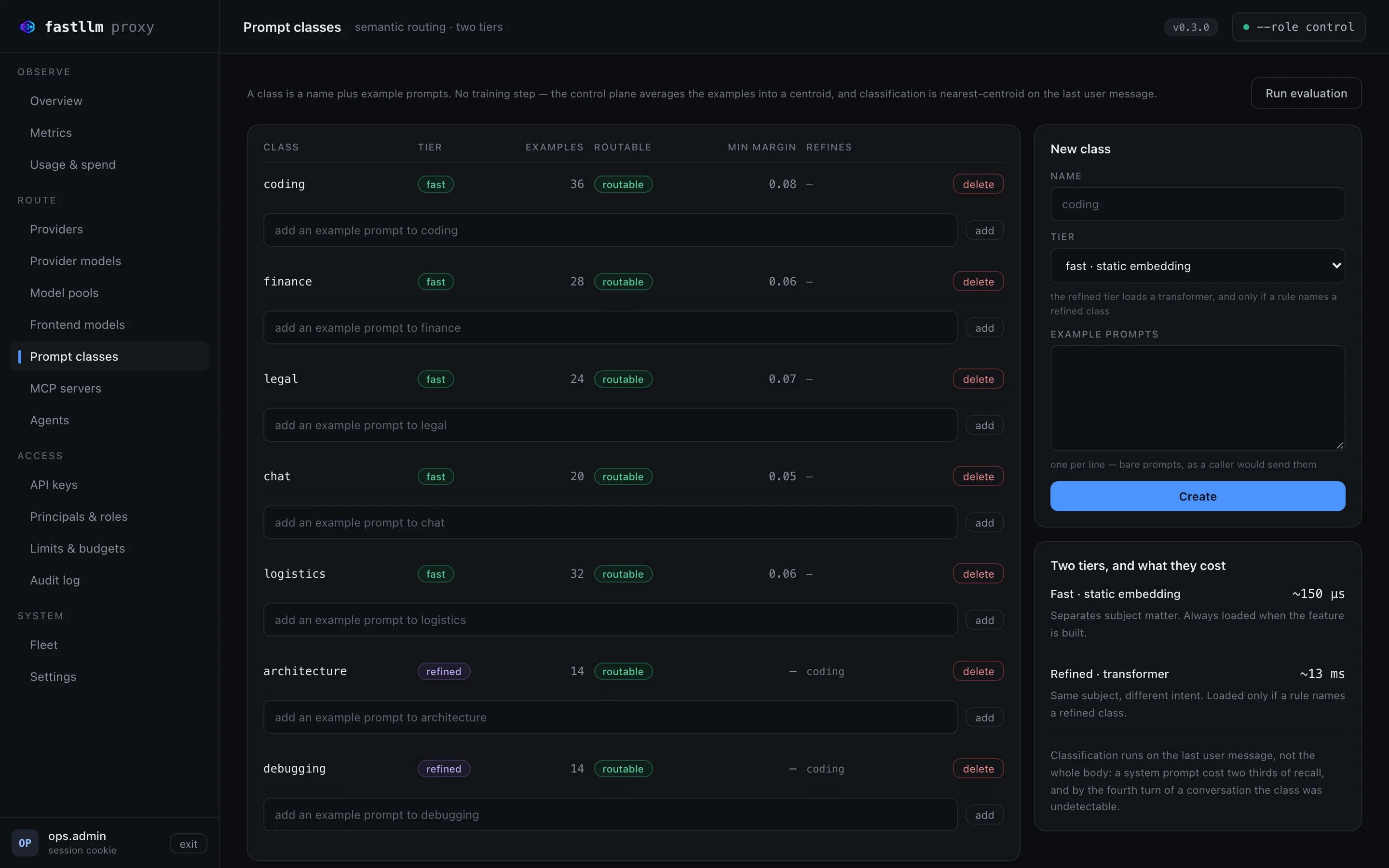
- Semantic routing Define topics such as coding, finance or legal from a handful of example prompts and route on them. There is no training step.
- Load balancing per model Cache affinity, least loaded, round-robin or lowest latency, set per model and grouped into model pools.
- Deployment-wide fallback model When every rule’s chain has run dry, one last-resort model answers. The caller doesn’t see an error.
Providers and APIs
- 80 hosted providers plus your own servers OpenAI, Anthropic, Gemini, Amazon Bedrock, Google Vertex AI, Azure OpenAI, OpenRouter, Mistral, Groq and others, and any OpenAI-compatible endpoint besides.
- Not just chat Chat, completions, responses, embeddings, reranking, images, speech, transcription and moderation all use the same endpoint and the same accounting.
- Anthropic and Gemini translated Their native wire formats are converted to and from the OpenAI API. Streaming, tool calls, and image and audio inputs come across too.
- MCP tool servers and A2A agents Tool servers and agents sit behind the same address and keys. Their permissions are kept separate from model access.
Access and spend
- API keys with roles Per-model grants and keys that expire after 90 days by default. A new principal can do nothing until someone gives it a role.
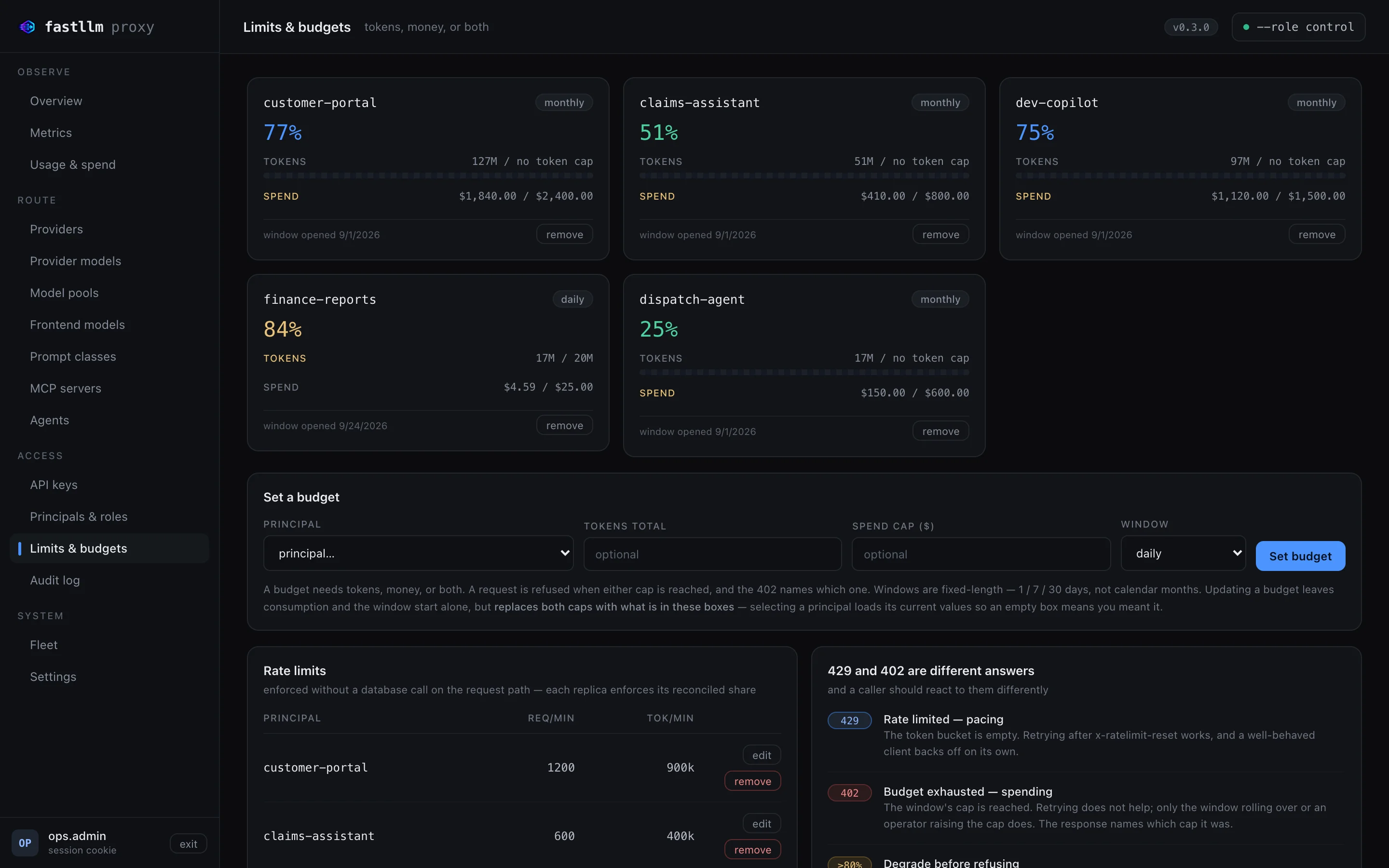
- Rate limits and budgets Requests and tokens per minute, plus daily, weekly or monthly token and spend caps for each principal.
- Degrade instead of refusing A rule can switch a caller to a cheaper or local model once, say, 80% of its budget is gone.
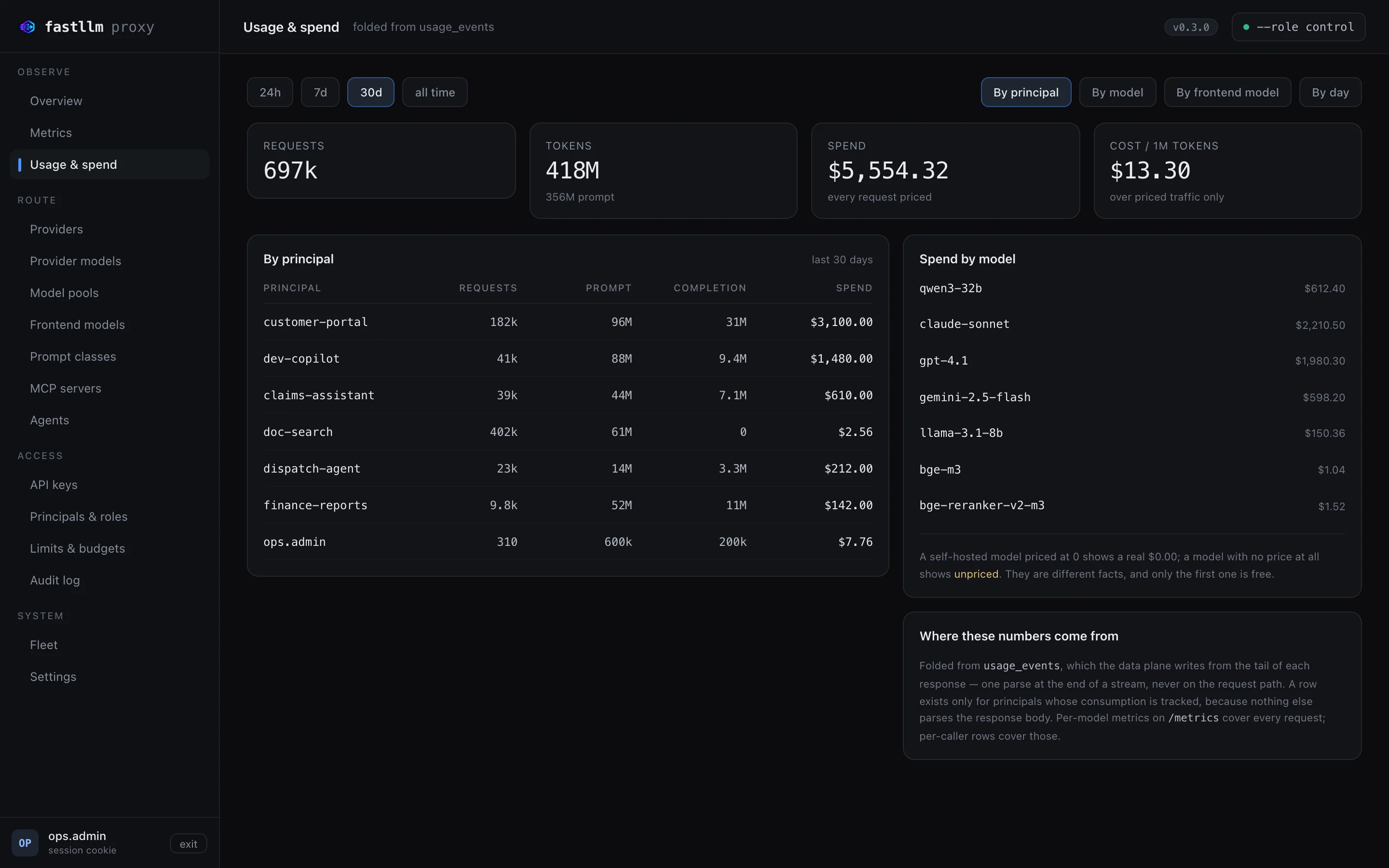
- Usage and spend reporting Requests, tokens and cost by principal, model, frontend model or day. Each request is priced at the rate that applied when it ran.
- Audit log Every administrative change is logged: who made it, and what it touched.
Operations
- Control plane and data plane split The same binary runs as a single process or as a control plane with many proxy replicas. One flag decides which.
- Keeps serving through trouble If a proxy loses its control plane, it carries on with the last configuration it knew. Configuration reloads never cut off a stream.
- Web console Providers, models, routing, prompt classes, keys, budgets, usage, fleet health and settings, all in one place.
- Metrics, traces and alerts Prometheus metrics and OpenTelemetry traces. Signed webhooks cover the conditions worth waking someone up for.
Who uses it, and for what.
Local first, cloud when busy
Serve internal assistants from your own GPUs while there is room. When there isn’t, overflow goes to a hosted model on its own.
Chargeback across departments
Each department or application gets its own key and budget. At month end you can report exactly what each one used and spent.
Sensitive topics stay in-house
Send prompts about finance or legal matters to a model on your own servers, and general questions to a hosted one. The applications don’t change.
At a glance
- Runs on
- Linux servers, Docker or Kubernetes, on your own infrastructure or in your cloud account
- Deployment
- Single binary, Docker Compose, Kubernetes manifests, a Helm chart or a Kubernetes operator
- Client API
- OpenAI-compatible HTTP API with streaming
- Integrates with
- vLLM, SGLang, llama.cpp, Ollama and 80 hosted providers; MCP tool servers and A2A agents; Prometheus and OpenTelemetry
- Built with
- Rust, plus a React web console
- Requirements
- PostgreSQL for the control plane; proxy replicas run without a database
- Security
- API keys hashed with SHA-256, passwords with Argon2id, provider credentials encrypted at rest with AES-256-GCM, TLS on the admin plane
Questions
Does it store our prompts and responses?
No. Usage records hold counts, cost and timing, and the audit log never captures request bodies. There is an optional response cache, switched on per model, that keeps answers in the proxy’s memory for a set time.
Can it run entirely on our own infrastructure?
Yes. It runs on your servers or in your cloud account. Put only self-hosted models behind it and nothing leaves your network.
Do our applications need to change?
Just the endpoint address and the API key. Anything that already speaks the OpenAI API will work, and LiteLLM configuration files are read as they are.
How do people sign in to the console?
Today, with a username and password; roles control what each person can change. Single sign-on is on the roadmap.
How is it priced?
It depends on the size of the deployment and the support you need. Book a demo and we’ll scope it with you.
Your models, your hardware, your rules.
Kuvryn AI
The platform for running AI agents, models and GPUs as a service. Teams run their agents and models on your own GPU servers, each in its own space, all from one console.
Learn moreAI application platformKuvryn
A self-hosted platform for AI applications on Kubernetes. See each application with its parts and its health, and when something breaks, the reason why.
Learn moreAI, automation and CI/CD/CT platformDhole
One workflow engine for build pipelines and infrastructure automation that also orchestrates AI agents, with a person approving where it matters.
Learn moreGitOpsSolder
A lightweight Kubernetes operator that keeps clusters in line with Git. It handles approvals and drift detection, and rolls back on its own. No database, no queue, no extra UI to run.
Learn moreSee it on your own data.
We run the demo with your data, then propose a scope and pricing.