
Kuvryn AI
Agent, model and GPUaaS platformYour AI agents and models on your own GPUs, run as a private service every team can use.
The platform for running AI agents, models and GPUs as a service. Teams run their agents and models on your own GPU servers, each in its own space, all from one console.
Every team wants agents and GPUs. Nobody wants to run the platform
Teams want to build and run AI agents on models they trust, with data that stays in-house. Behind that sit GPUs, model weights, inference engines and agent runtimes, all of which have to be set up and kept running for many teams at once. Without one platform, you get scattered servers and scripts that nobody can see into or share fairly.
Why it’s built the way it is.
Agents, models and GPUs on one platform
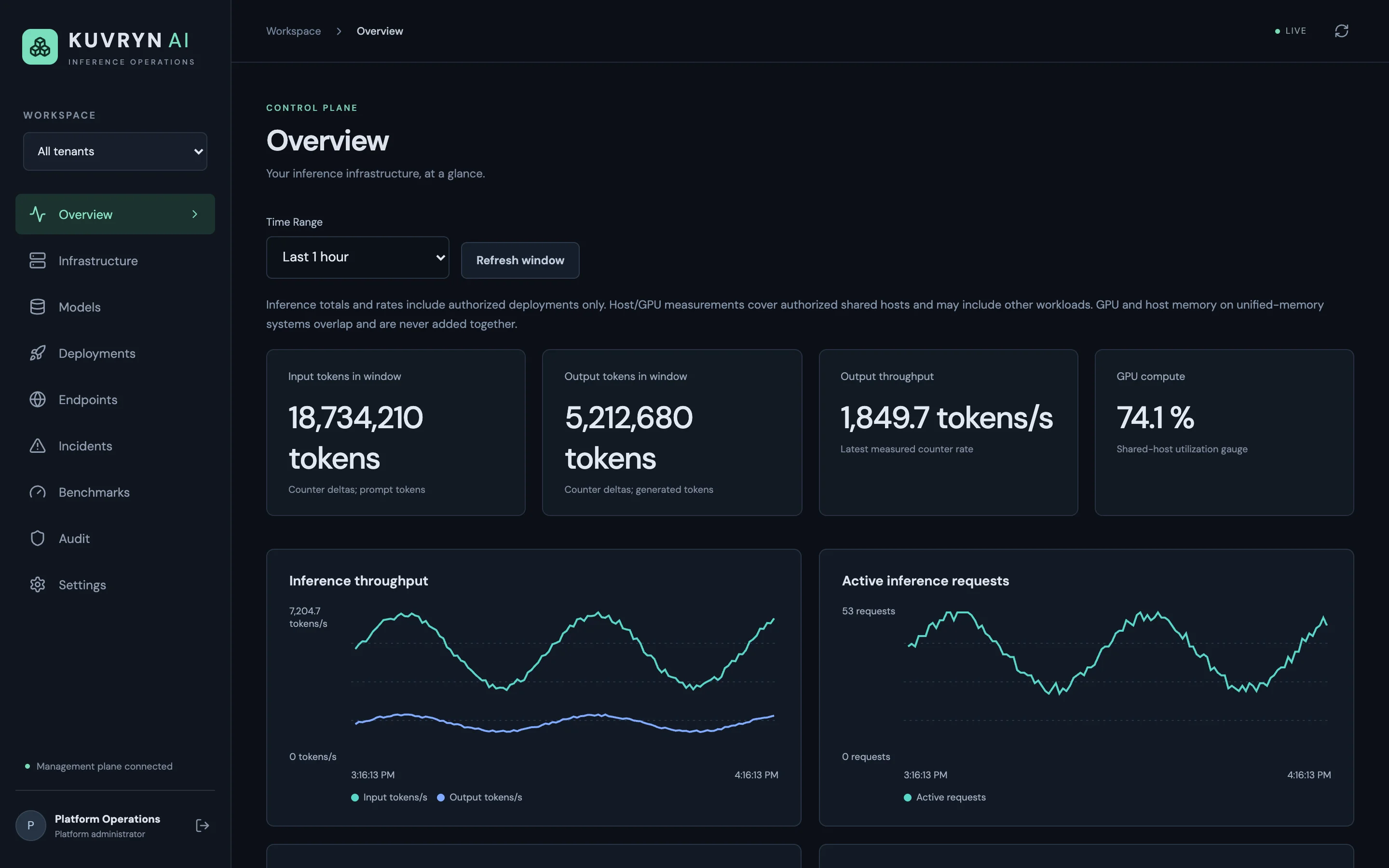
Teams run their AI agents on the models and GPUs they’ve been allocated. It is all managed from the same console.
Agents dial out. Nothing dials in
Each GPU server or Kubernetes cluster runs an agent that opens an outbound, mutually authenticated TLS connection to the control plane. Your GPU hosts need no inbound ports. The control plane holds no Docker socket, no cluster-admin token and no SSH keys.
Three engines, one way of working
vLLM, SGLang and llama.cpp deploy from curated, pinned runtime images, on standalone Docker hosts or on Kubernetes. Before a deployment starts, Kuvryn AI checks that the model, engine and hardware fit together.
Every configuration is a numbered generation
Each change to a deployment is saved as a new generation, with its image, settings and placement. Compare any two. Roll back in one step, and the server rechecks compatibility first.
From setup to everyday use.
- 1
Connect your servers
Add agent generates a one-time install command for a Docker host or a Kubernetes cluster. The agent enrols, reports its GPUs, memory, network and storage, and holds an outbound connection open.
- 2
Bring in the models
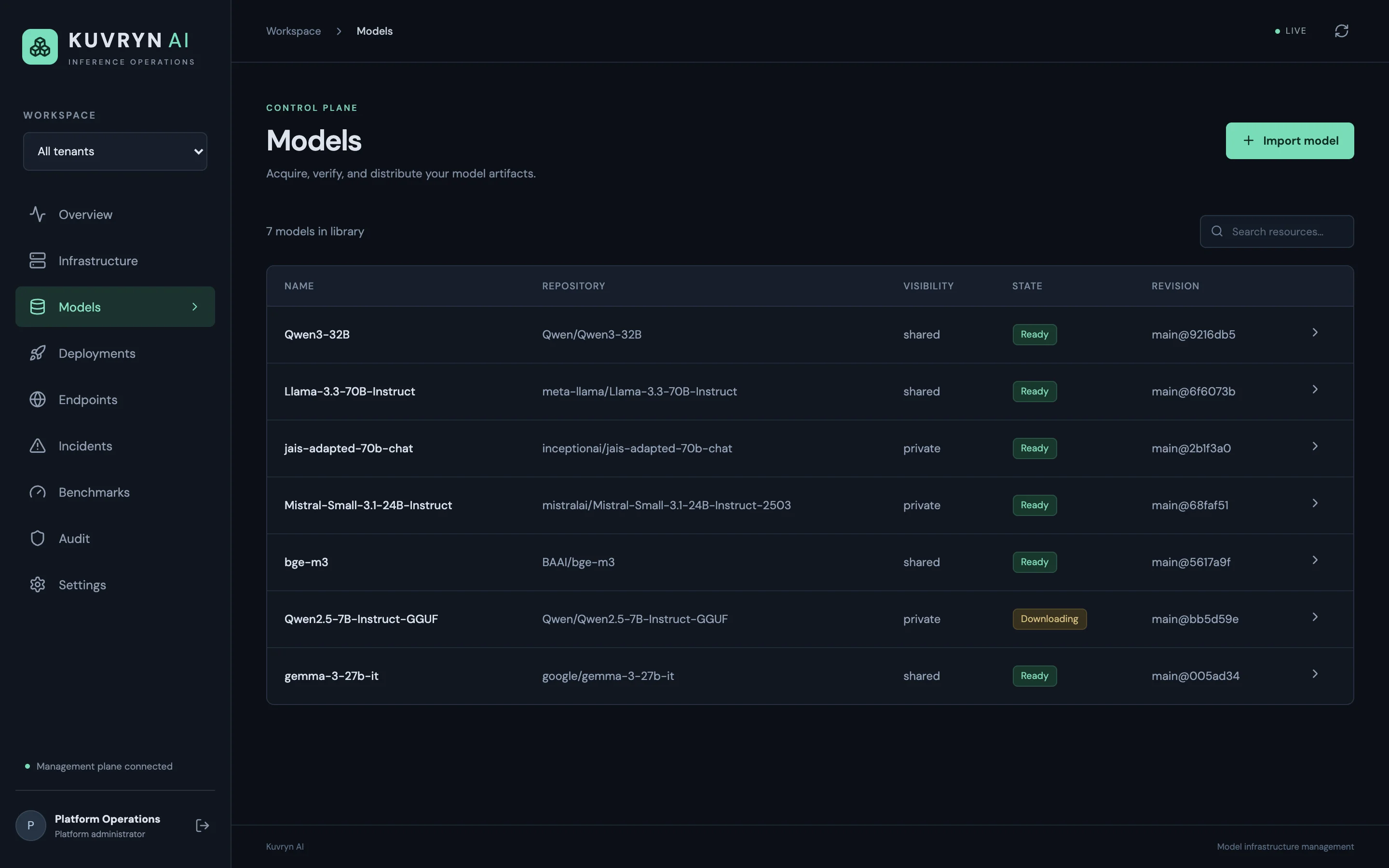
Search Hugging Face from the console and import a model at a pinned revision. Private credentials are stored encrypted, per team. Files are checked against their SHA-256 hash and kept on your NFS or S3-compatible storage.
- 3
Plan and deploy
Pick a model, an engine and a runtime image. Kuvryn AI scores the candidate hosts and estimates weight and KV-cache memory. Then it reserves the GPUs and ports and starts the engine.
- 4
Watch and fix
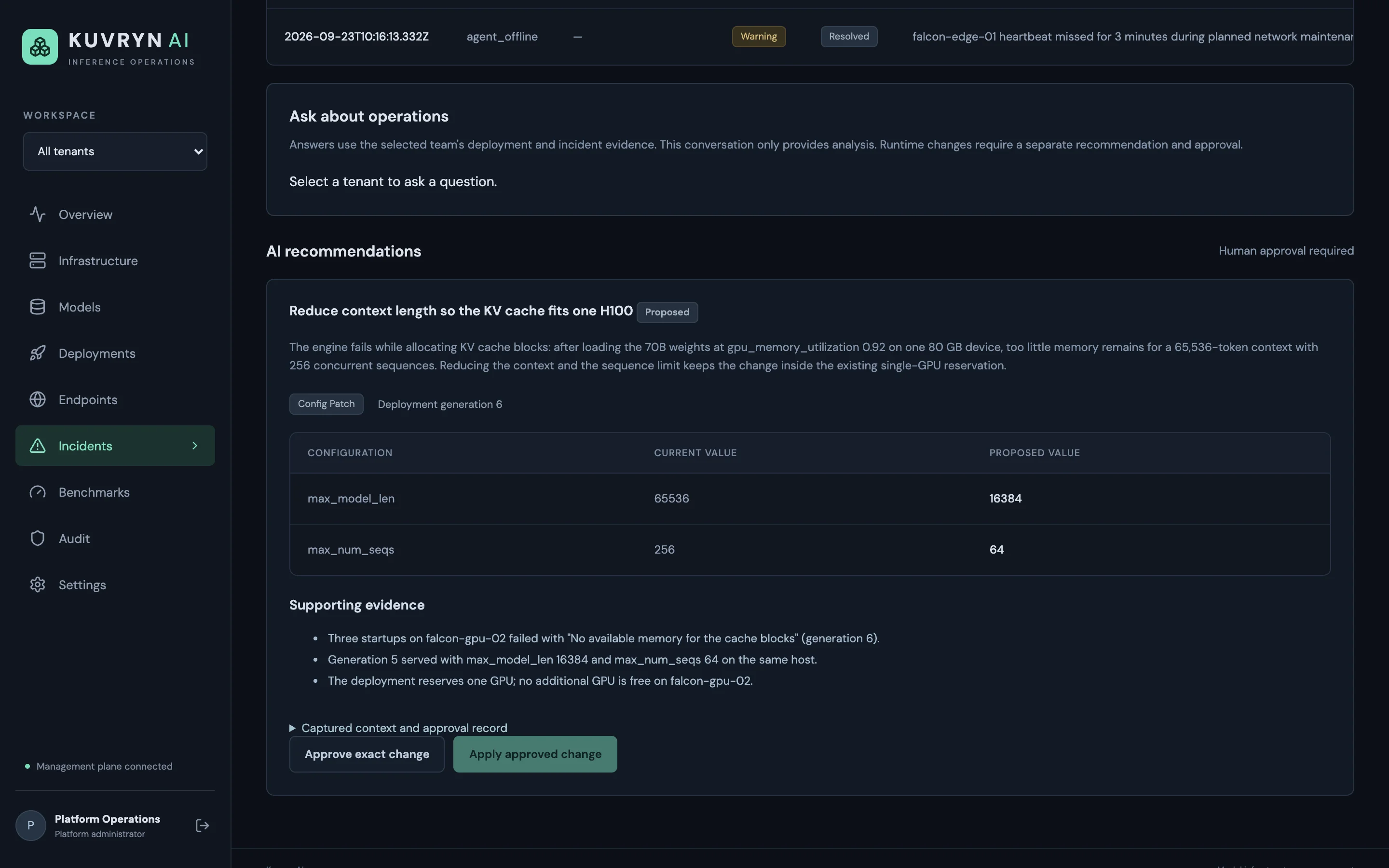
Throughput, GPU and memory graphs, logs and typed incidents show what each deployment is up to. Failed starts are retried within limits, and the AI assistant can propose a fix for someone to approve.
- 5
Measure and compare
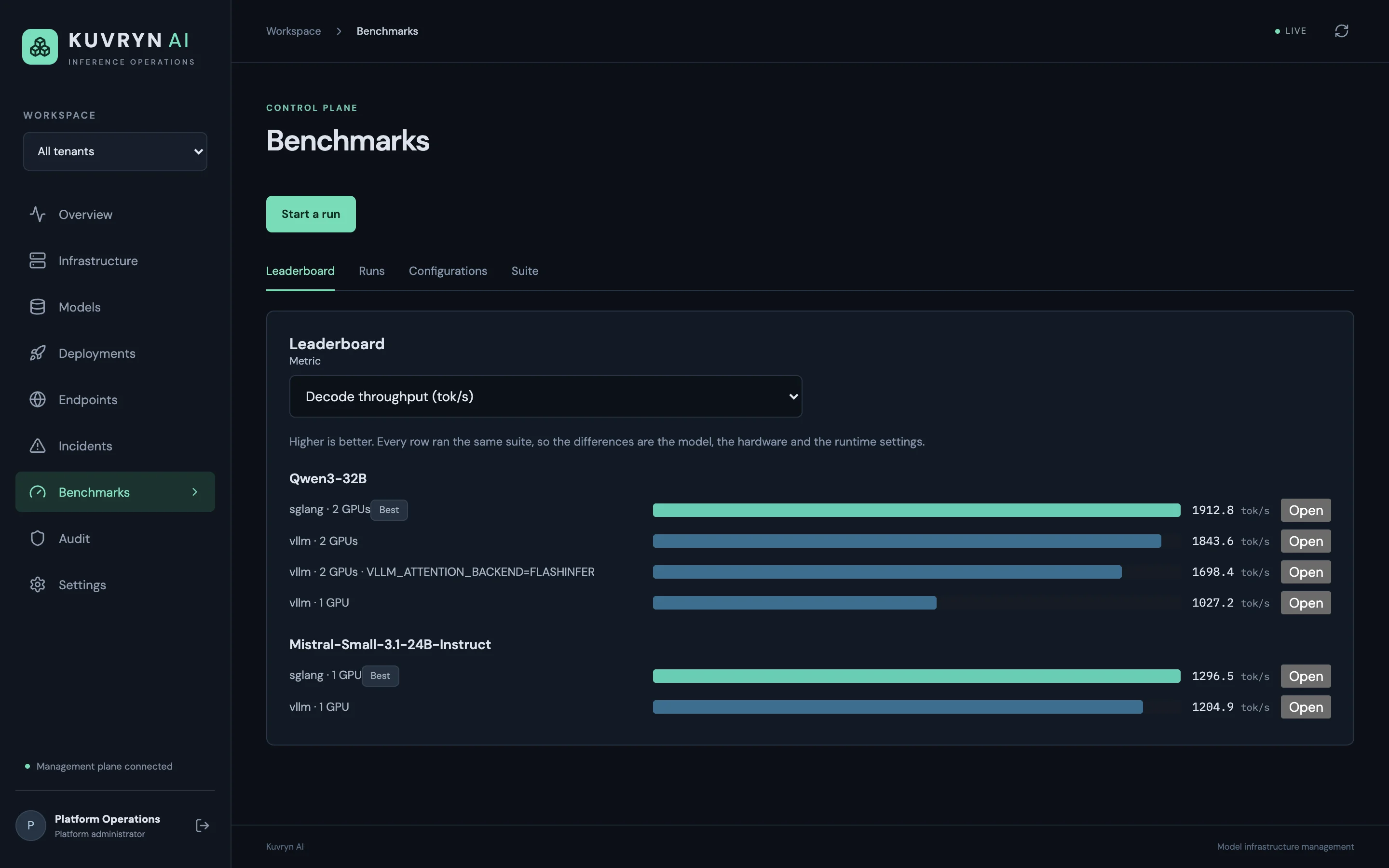
Run the fixed benchmark suite against a model on the hardware and settings you choose. The leaderboard shows which engine and configuration serve it best.
See Kuvryn AI at work.
What it does, in detail.
Models and storage
- Hugging Face import Search the catalogue and import at a pinned revision. Gated or private models use access tokens stored encrypted per team.
- Verified copies Model files are stored by content hash and checked with SHA-256 when they arrive on a host.
- Your storage Keep models on several NFS shares and S3-compatible buckets, and move them between those with verification.
- Host cache control See which models are cached on which host. Pin the ones you need; evict the rest.
- Shared or private models Share a model across teams, or keep it private to one.
Deployment and placement
- vLLM, SGLang and llama.cpp Every engine runs from a curated, pinned image. Administrators can approve custom images as well.
- Docker hosts and Kubernetes Standalone GPU servers and Kubernetes clusters are managed side by side. Each cluster has one management agent.
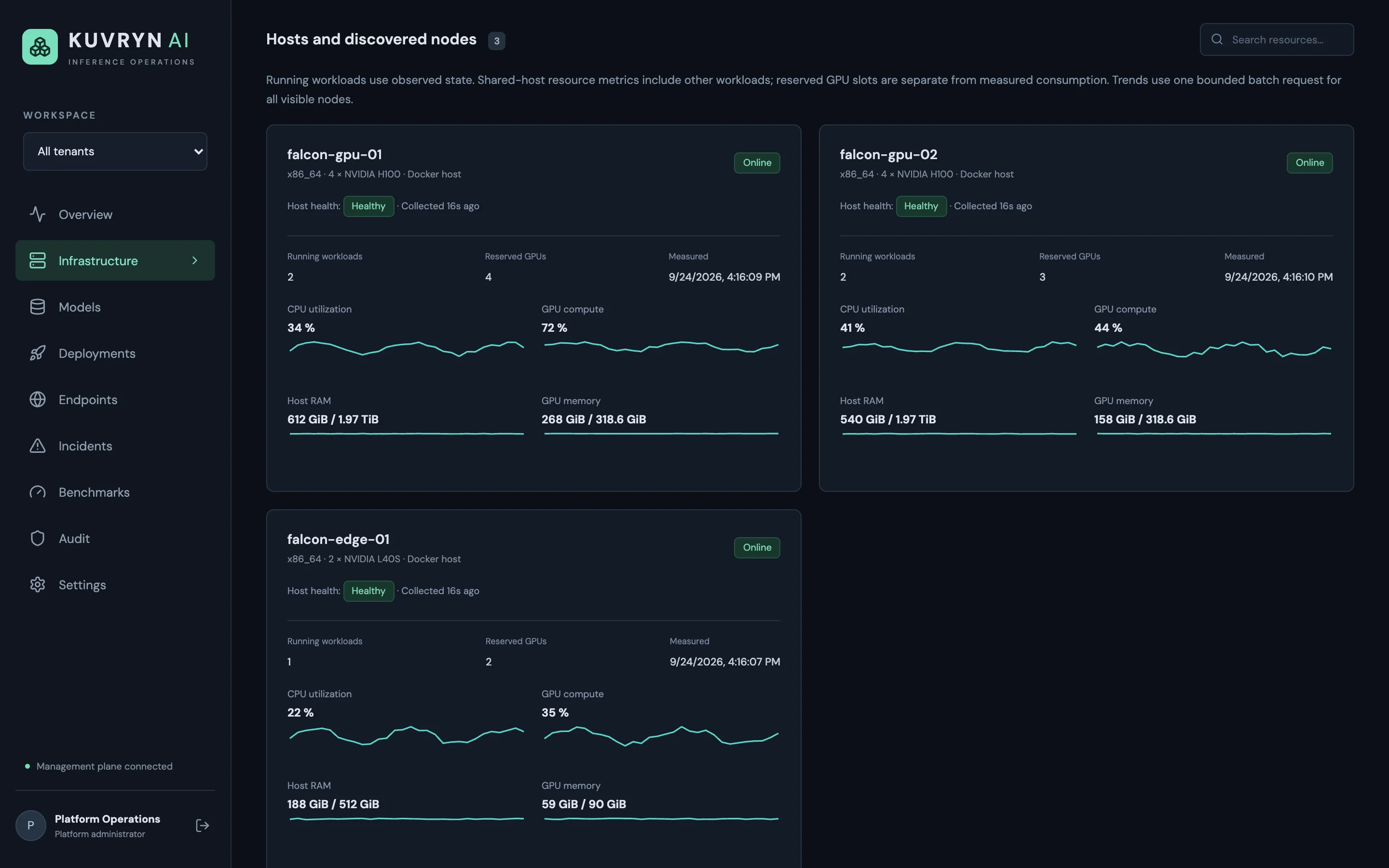
- Placement you can follow Candidate hosts are scored on free GPU memory and model cache. GPU and port reservations are taken atomically.
- Multi-host models Where the engine and network allow it, one model can span several hosts. vLLM tensor parallelism over two servers is one example.
- Lifecycle control Start, stop, restart, reconfigure, clone and roll back. A stale-change check stops two people overwriting each other.
Operations and AI assistance
- Live metrics Token throughput, active requests, GPU use and memory, per host and per deployment. Samples and logs are kept for 72 hours.
- Typed incidents Failures are classified (GPU out of memory, KV-cache allocation, model load, agent offline and so on) with an evidence timeline and the captured logs.
- Operations questions Ask about a team’s deployments and incidents in plain language. The answers are analysis only; they change nothing.
- Approved fixes An AI proposal shows each setting’s current and proposed value. Nothing happens until someone explicitly approves it and then applies it.
- Benchmark leaderboard A fixed suite of prompt sizes, context depths and concurrency levels. Runs are ranked by decode speed, prefill speed or time to first token.
Access and governance
- Teams as tenants A team sees only its own deployments. Several teams can share one GPU cluster.
- Roles Platform administrators, plus admin, operator and viewer roles inside each team.
- Sign-in Built-in accounts, or single sign-on through your OpenID Connect identity provider.
- Audit trail Every management action is recorded: who did it, to what, and when.
- Signed webhooks Send events to your own systems over HTTPS. Each one is signed and retried automatically.
Who uses it, and for what.
Private AI agents for regulated work
Run your agents on in-house models. The sensitive data they handle never leaves your infrastructure.
Private models for regulated data
Banks, insurers and government teams can serve Llama, Qwen or Arabic-language models on their own GPUs. Prompts and documents stay inside the network.
One GPU estate, many teams
Several business units share the same GPU servers, each with its own models, deployments and permissions. The platform team sees all of it.
At a glance
- Runs on
- Your own infrastructure: Kubernetes for the control plane; standalone Docker GPU hosts and Kubernetes clusters for the models
- Deployment
- Helm chart with two control-plane replicas, a three-replica PostgreSQL cluster (CloudNativePG) and HTTPS ingress
- Inference engines
- vLLM, SGLang and llama.cpp (CPU-only llama.cpp included)
- Hardware
- NVIDIA GPUs, DGX systems included; AMD and Intel GPUs are discovered and can be scheduled with approved runtime images
- Model storage
- NFS shares and S3-compatible object storage
- Integrates with
- Hugging Face, OpenID Connect sign-on, any OpenAI-compatible model endpoint for the AI assistant, HTTPS webhooks, a REST API (OpenAPI 3.1)
- Built with
- Go for the control plane and agents, PostgreSQL, and a React and TypeScript console
Questions
Does any of our data leave our network?
No. The control plane, agents, models and storage all run on your infrastructure. The AI assistant calls a model endpoint you configure, and that can be a model you host yourself.
Do we have to open firewall ports on our GPU servers?
No. Agents connect outbound to the control plane over mutually authenticated TLS. GPU hosts need no inbound management access at all.
Can the AI change our deployments on its own?
No. It can only propose a restart, a stop or specific setting changes. Someone with operator rights has to approve that exact change and then apply it, and every step is audited.
Does it replace our inference gateway or API keys for applications?
No. Kuvryn AI manages the models, the engines and the infrastructure underneath, and reports each engine’s endpoint. Routing application traffic and issuing application tokens stay with the gateway you already have.
How is it priced?
It depends on the number of GPU hosts and teams, and the support you need. Book a demo and we’ll scope it with you.
Your models, your hardware, your rules.
FastLLM Proxy
An OpenAI-compatible gateway in front of your own LLM servers and 80 hosted providers. Routing, budgets and access control live in one place.
Learn moreAI application platformKuvryn
A self-hosted platform for AI applications on Kubernetes. See each application with its parts and its health, and when something breaks, the reason why.
Learn moreAI, automation and CI/CD/CT platformDhole
One workflow engine for build pipelines and infrastructure automation that also orchestrates AI agents, with a person approving where it matters.
Learn moreGitOpsSolder
A lightweight Kubernetes operator that keeps clusters in line with Git. It handles approvals and drift detection, and rolls back on its own. No database, no queue, no extra UI to run.
Learn moreSee it on your own data.
We run the demo with your data, then propose a scope and pricing.