
Kuvryn
AI application platformRun your AI applications on Kubernetes as applications. See their parts, their health and why they fail.
A self-hosted platform for AI applications on Kubernetes. See each application with its parts and its health, and when something breaks, the reason why.
Clusters show objects. People think in applications
A production cluster holds hundreds of Deployments, Pods, Services and custom resources, and most consoles list them one type at a time. To work out which pieces make up one application, how traffic reaches it and why it’s failing, someone reads YAML, events and logs by hand. Every incident takes longer, and the know-how stays with a few platform engineers.
Why it’s built the way it is.
Applications, not object lists
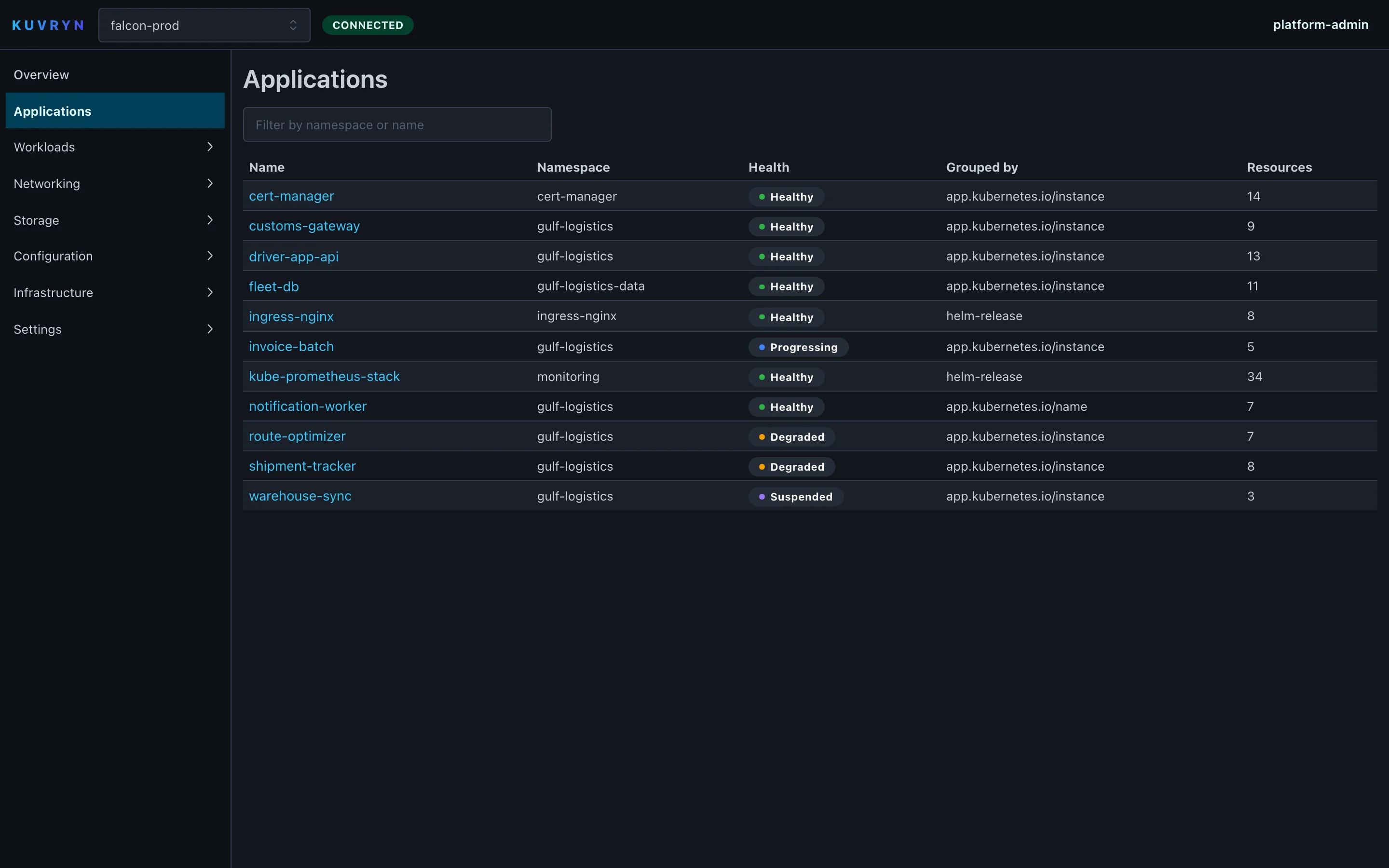
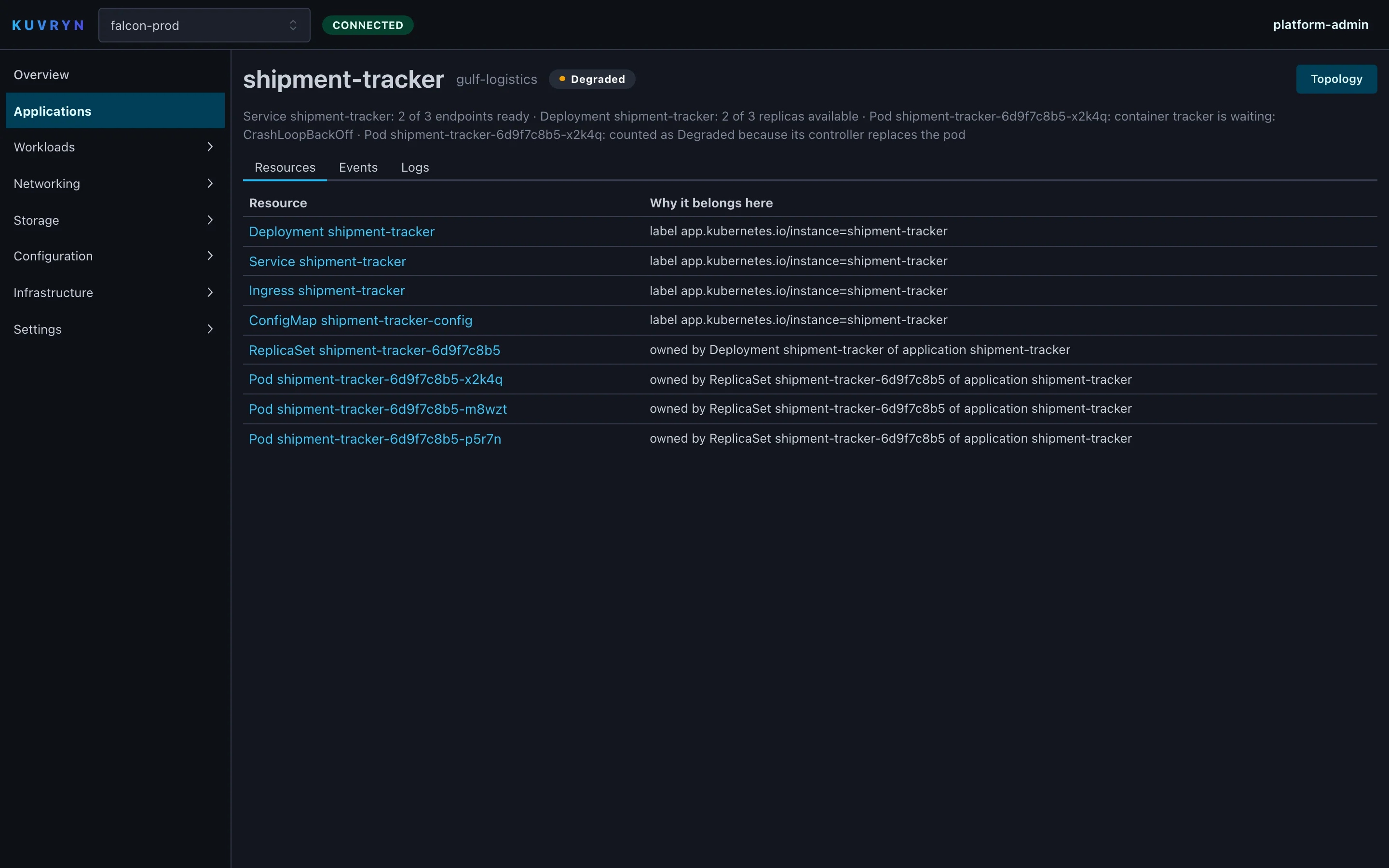
Kuvryn groups resources into applications using standard Kubernetes and Helm labels. Unlabelled pieces are pulled in through owner references and Service selectors. Each member shows why it belongs.
Health, with the reason
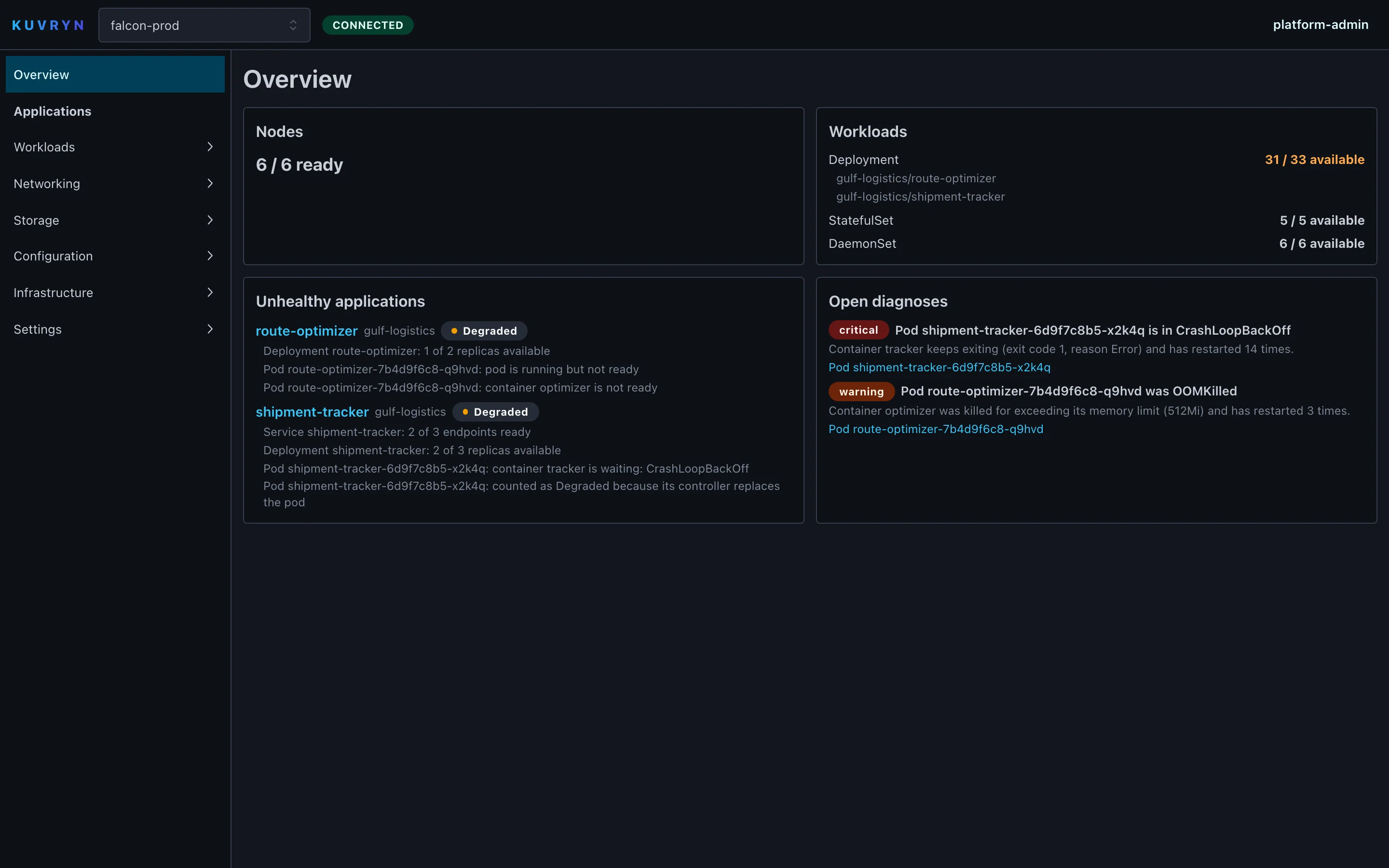
Every Pod, workload, Service, volume claim, node and application gets one of six health states. Each state lists the reasons behind it. Nobody has to guess why something is marked Degraded.
Diagnosis without an AI model
Deterministic rules catch crash loops and out-of-memory kills and record structured evidence with a severity and a confidence. Each diagnosis is kept with its first seen, last seen and resolved times.
See a change before it is applied
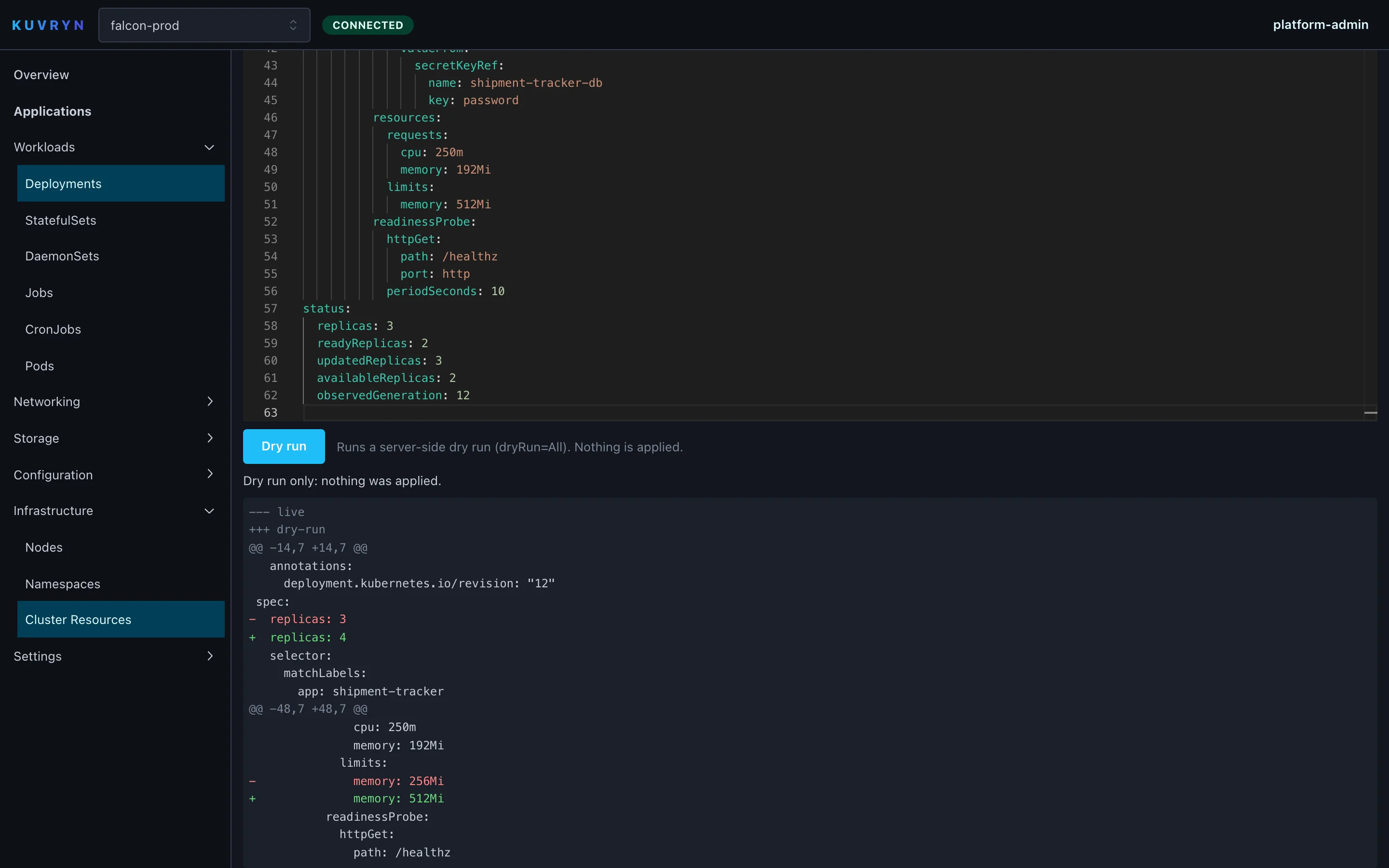
Edit any resource in a YAML editor. Kuvryn runs a server-side dry run and shows the diff against the live object, and nothing is written to the cluster.
From setup to everyday use.
- 1
Install with Helm
A single engine binary, web console included, goes into a Kubernetes cluster through its Helm chart. Next to it runs a PostgreSQL database for users, roles, audit and diagnoses.
- 2
Connect your clusters
Upload a kubeconfig or use the cluster Kuvryn runs in. For clusters it can’t reach directly, install a small agent that connects out to the engine.
- 3
Kuvryn builds its picture
The engine discovers every resource type, custom resources too, and keeps them in a live cache. From that it works out the relationship graph, the applications and their health.
- 4
Find what is wrong
The overview lists unhealthy applications and open diagnoses. Drill in from there to the application, its topology, its events and its logs.
- 5
Check a fix safely
Edit the YAML and run a server-side dry run. You see exactly what would change before anyone applies it with their usual tooling.
See Kuvryn at work.
What it does, in detail.
Understanding
- Application inference Groups resources by app.kubernetes.io/instance first, then app.kubernetes.io/name, then Helm release. Owned and selected resources are pulled in after that.
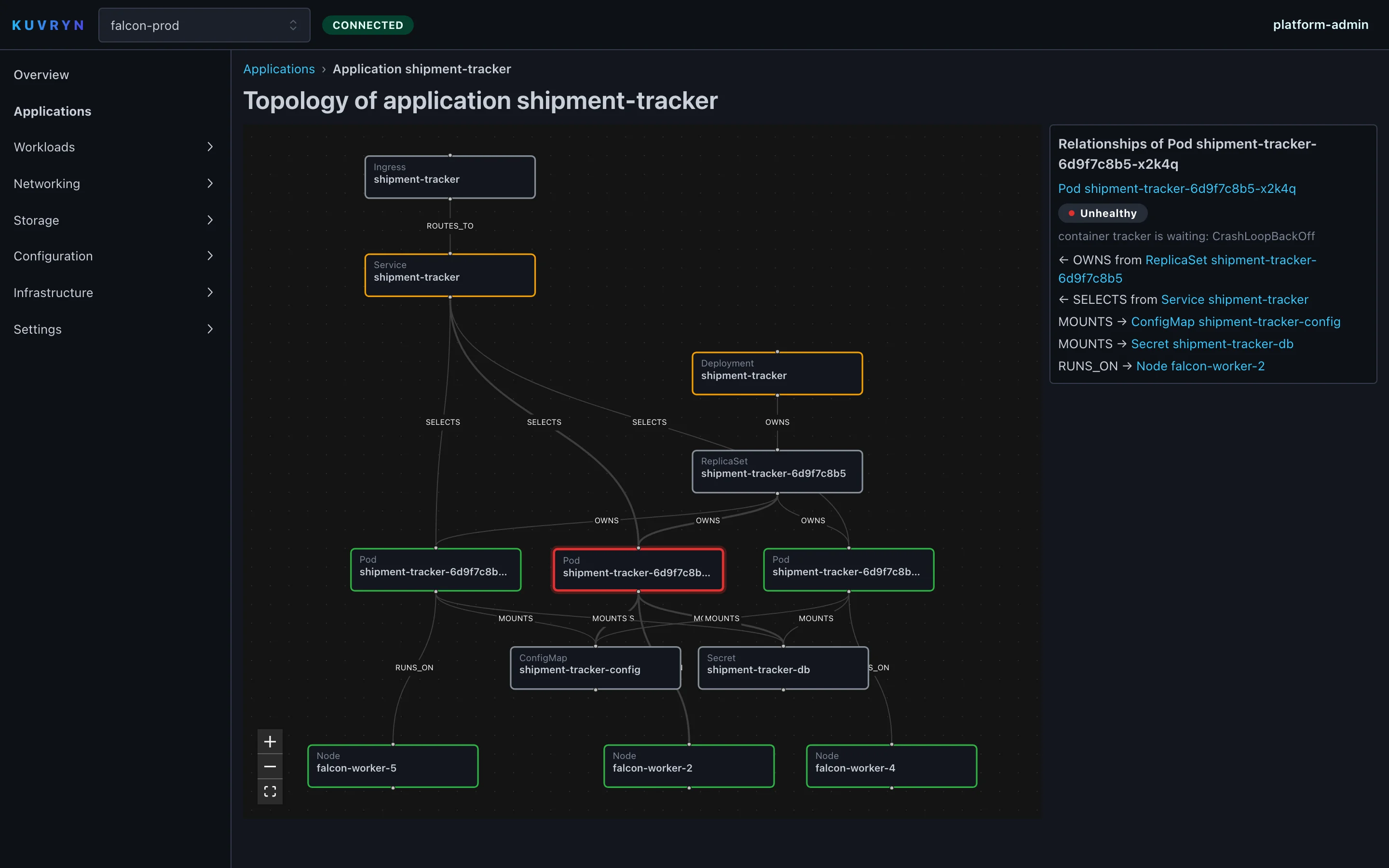
- Relationship graph Tracks what owns, selects, routes to, mounts, is backed by or runs on what. Live cluster events keep it current.
- Topology view Draws an application, or a single resource, as a laid-out graph with health on every node. Select a node to list its relationships.
- Cluster overview Node readiness, workload availability, unhealthy applications and open diagnoses, on one page.
Troubleshooting
- Health with reasons Healthy, Degraded, Unhealthy, Unknown, Progressing or Suspended. The reasons are listed and rolled up to the application.
- Crash loop and out-of-memory diagnosis Spots CrashLoopBackOff and OOMKilled containers, with exit codes, restart counts and memory limits as the evidence.
- Events Kubernetes events per resource and per application, in time order and de-duplicated.
- Logs Container and previous-container logs, tail limits and live follow. You can also read one chronological stream across every pod of an application.
Resources and YAML
- Every resource type A table for each discovered type, custom resources included, built from the cluster’s own discovery data and printer columns.
- Detail pages Pods, Deployments, Services, Ingresses and volume claims show their parents and children, related events and the application that owns them.
- YAML editor with dry run A code editor for any resource, with a server-side dry run and diff. Viewers get it read-only.
- Live updates The console updates from a server-sent event stream. No polling.
Security and access
- Roles from day one Platform Admin, Cluster Admin, Operator, Developer and Viewer. Granted per cluster, and enforced on the server for every request.
- Audit log Sign-ins, user and role changes and cluster changes are logged with the actor, the time and the before and after values. The API cannot edit them.
- Credentials stay in the engine Cluster credentials are encrypted with AES-256-GCM and never sent to the browser. Secret values are never read or shown.
- Outbound-only agent The agent connects out over TLS and authenticates with a certificate the engine issued. It forwards requests only to its own cluster’s API server.
Who uses it, and for what.
Faster incident triage
From an unhealthy application on the overview to the failing pod, its diagnosis, events and logs in a few clicks. No string of kubectl commands.
Handing clusters to application teams
Give developers read access to the clusters they need, with applications and health they can make sense of. Logs, dry runs and administration stay behind roles.
Private and remote clusters
See clusters at branch sites, on private networks or in other clouds through the outbound agent. Their API servers stay closed to inbound access.
At a glance
- Runs on
- Kubernetes, on linux/amd64 and linux/arm64
- Deployment
- Self-hosted: a Helm chart for the engine, with PostgreSQL managed by CloudNativePG
- Cluster connections
- Kubeconfig upload (token or client certificate), an in-cluster service account, or the outbound agent
- Built with
- Go and client-go; React, TypeScript, Mantine, React Flow and Monaco
- Requirements
- The CloudNativePG operator, plus an ingress controller and cert-manager if you use the bundled Ingress
- Sign-in
- Local users with argon2id passwords, server-side sessions and roles per cluster
Questions
Can Kuvryn change things in our clusters?
Not today. Edits are checked with a server-side dry run and shown as a diff, and nothing is applied. Applying changes through a plan, an approval and an audit trail is where the product is heading.
Where does our data live?
On your own infrastructure. The engine reads cluster state into memory. Its PostgreSQL database holds only Kuvryn’s own data (users, roles, settings, audit entries and diagnoses), never copies of your Kubernetes objects.
What happens to our cluster credentials and Secrets?
Kubeconfigs are encrypted with AES-256-GCM and never leave the engine. Secrets are cached as metadata only, so their values are never read, stored or shown.
Do we need AI or an external service for the diagnosis?
No. Diagnosis runs on deterministic rules inside the engine. There is no language model involved and no call to an outside service.
How is it priced?
It depends on the number of clusters and the support you need. Book a demo and we’ll walk through it on one of your own clusters.
Your models, your hardware, your rules.
FastLLM Proxy
An OpenAI-compatible gateway in front of your own LLM servers and 80 hosted providers. Routing, budgets and access control live in one place.
Learn moreAgent, model and GPUaaS platformKuvryn AI
The platform for running AI agents, models and GPUs as a service. Teams run their agents and models on your own GPU servers, each in its own space, all from one console.
Learn moreAI, automation and CI/CD/CT platformDhole
One workflow engine for build pipelines and infrastructure automation that also orchestrates AI agents, with a person approving where it matters.
Learn moreGitOpsSolder
A lightweight Kubernetes operator that keeps clusters in line with Git. It handles approvals and drift detection, and rolls back on its own. No database, no queue, no extra UI to run.
Learn moreSee it on your own data.
We run the demo with your data, then propose a scope and pricing.